
PHP & Web Development Blogs

Search Results For: their
Showing 6 to 10 of 30 blog articles.
7543 views · 6 years ago


At Nomad PHP our goal is to empower developers in building a habit of continuous learning - and that means we have a habit of continuous improvement ourselves. Here are just some of the things we've done this year (with much more coming down the road)!

Website Redesign


We've refreshed the look and feel of Nomad PHP to better emphasize the goal of Nomad PHP - to help developers build a habit of continuous learning and grow their careers. This includes numerous usability enhancements as well as a focus on our new book library, blogs, and certification in addition to virtual meetups, workshops, conferences, and on-demand videos.

Free Meetups


As technology has advanced, more and more meetups and usergroups are able to stream their local usergroup meetings.

As our goal has always been to make technology accessible, we are proud to provide free streaming technology for local user groups, and share local user group meetings on our live virtual meetup schedule.

Student and Professional subscribers will continue to have access to our monthly conference level Pro Talks, hands on virtual workshops, and live conference streams in addition to streams by local user groups.

You can find a list of all upcoming talks (free and Pro) on our Live Meetings Page, or add your user group stream here.

Free Subscriber Tier


As our mission has evolved from being the meetup for developers without a meetup group to building an inclusive community of PHP developers where you can network, grow your skills, and share your knowledge with others - we are excited to announce our new Free Tier.

With a free Nomad PHP account you can:

* Stream free meetups

* Watch ad-supported videos in SD

* Read PHP blogs and write your own

* Network with other PHP developers

Create your free developer account to get started.

New Student Tier


To provide the best value, we've also restructured our plans to provide professional online meetings, workshops, and conference streaming to our Student Tier. This will allow students and new developers the chance to learn from the best speakers and top practioners and obtain entry level certifications at the best price possible.

However, with the addition of PHP Books and Magazines, and in order to provide the best value while keeping the Student plan affordable, new Student subscribers will not have access to the PHP Book and Magazine Library, or advanced certifications. These will now require a professional plan.

Student plans start at $12.95/mo

PHP Books and Magazines


We're excited to announce that we have expanded our PHP library. In addition to the ability to read the latest issues of php[architect] magazine, Professional subscribers now have access to read PHP and web development books online.

We're excited to announce the availability of Chris Hartjes' bookThe Grumpy Programmer's Guide to Testing PHP Applications, as well as several titles from Notes for Professionals, andUndisturbed REST: a Guide to Designing the Perfect API.

More titles including exclusive titles will be made available for online reading soon.

You can view our entire PHP Library here.

Blog Updates


We've received a lot of feedback on the blog writing process, and have upgraded several aspects of our blogging software. This includes the ability to save drafts prior to publishing, and the ability to upload, edit, and crop images and videos. We've also added some bug fixes for editing and writing code.

We're also excited to share that members with Student and Professional plans can now have their ownVLOG (video blog) with the ability to screencast/ record video from your webcam within the blog.

To see the most recent blog posts, or write your own, visit the Nomad PHP Blogs.

Certification Updates


We've updated our certifications for better usability and readability. We've also reworked some of the code samples and questions in our Level 1 PHP Certification exam.

You can find our available exams, test your skills, and obtain your Nomad PHP certification here.

Team Management


Our new team manager allows you to easily add or remove team members with your Nomad PHP team subscription. You'll also find real time metrics on how your team is using Nomad PHP, who on your team is investing in their growth and streaming meetups, watching videos, reading books, and earning certifications, and the overall content value consumed by your team.

The Team Manager is available to new teams, and will be made available to existing team managers over the next several weeks.

2020 Roadmap


There's still plenty of more great things coming in 2020. Here are the items at the top of our list:

* Mobile app for offline viewing

* Desktop app for offline viewing

* Nomad PHP member only books

* PHP Level 2 Certification

* Interactive tutorials

* Better video support in blogs

* Ability to schedule blog posts

* Meeting software for local usergroups

* Improved plan management for subscribers
Of course, what's most important to us is what's most important to you. Leave what you want to see on Nomad PHP in the comments below and if we're able to we'll get it added to our roadmap!
12846 views · 6 years ago


Welcome back! If you’re new to this series have a look at Part 1 here


Today’s focus is on templating, the aesthetic that will make or break your web application.

Having a clean design with well defined CSS that’s responsive and user friendly goes a long way.

Developers often stick to their lane but delving into templating will bode in your favor, you can indeed
create a functional and launch-worthy application all on your own!

Let’s jump into it!

Structured structure


Everything you tackle should be found with ease down the line. Therefore careful planning is fundamental to the success and sustainability of your project. You’ll also find that clearly defining your work lends itself to more productivity overall as you spend less that explaining your work during a handover / looking for a specific piece of code or resource. You’ll probably end up spending more time on actual work.
Finding your own unique pattern with file structure and CSS identifiers will also work in your favor as something unique to your process will most likely be easier to remember and form a tactile relationship with.

Our project’s current structure looks like this:
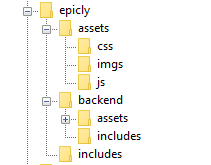


>If you need to backtrack, Part 1 is a great place to start!

In part 1, we created our index.php which displays info from our database.

Let’s take this a step further and create a header and a footer for our index.php

Create a file called header.php and save this to your includes folder.

Next, create a file called footer.php and save this to your includes folder.

Your file structure should now look like this.
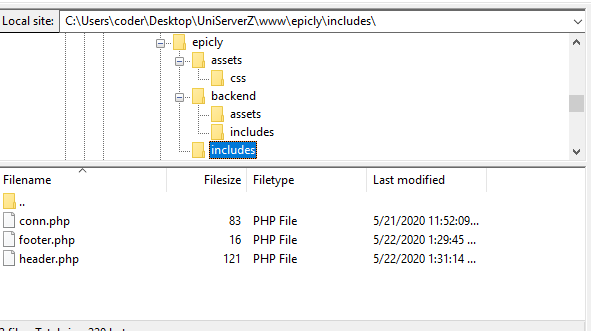


A header above all the rest


The header file will be a file we reuse throughout your web application. This file will contain important information that’s vital to the functionality and aesthetic of your website.
The type of info you’ll expect to see in a header.php file:
Script includes
Such as JQuery and important libraries
CSS includes
CSS files loaded from internal or external sources
Meta information
Contains important information that’s readable by search engines.
The basic structure of the beginning of your app, including your menu, and your logo.
For now, how header is going to have a basic layout.

Let’s get our HTML on!

<html>
<head>
<title>My Awesome CMS – Page Title</title>
</head>
<body>


A footer that sets the bar

Create a file called footer.php and save it to your includes folder (yourcms/includes/footer.php).

Add this code to your new file.

</body>
</html>


Next, let’s focus on the gravy… The CSS


CSS, when written beautifully, can truly set you apart.

You can tell your web application to load various styles to specific elements by defining unique identifiers.
Styles that are only used once are denoted with a # (a CSS “ID”) whereas styles that are reused multiple times are denoted with a . (a CSS “class”)

The best way to delve into the realm of CSS is to learn by experience.

Let’s create!


First, we need to create and load our CSS file. Remember our nifty new pal header.php? This created a convenient way to load our CSS file!

Add the following code to your header.php just above the </head> tag.

<link href=”../assets/css/style.css” type=”text/css” rel=”stylesheet”/> 


The ../ in the link to our stylesheet means we have to leave the current directory (the directory that header.php is in) and look for the assets/css/ directories.

Go ahead and create the css folder under your assets folder.

Next we’re going to create some simple CSS to test things out.

It’s time to add some style!


We are going to create two divs.
A div is a divider / section in HTML.
Add this to your index.php (located in your CMS’ root folder) above the <?php tag.

<div id="myfirstid"></div>
<div class="myfirstclass"></div>


Then, create a CSS file

Add this:

#myfirstid{
Background:lightblue;
Font-family:Arial;
Font-size:44px;
Font-weight: Bold;
}
.myfirstclass{
Font-size:15px;
Color: darkblue;
}


Save your newly created CSS to assets/css/ as style.css.

Pulling it all together, let’s see what we can do!


Let’s apply what we just learned to our index.php. But first, we should add our header.php and footer.php files.

Including everyone


Add this to the top of your index.php file:

include(‘includes/header.php’);


Remove the <divs> we used for practice earlier, we have something better in store!

Add this to the bottom of your index.php:

include(‘includes/footer.php’);


Next, let’s modify our code so we can add some style to the data we retrieve from our database.

Modify the following line:
foreach($getmydata as $mydata){ echo "Title: "; echo $mydata['title']; echo "<br/>"; echo "Content: "; echo $mydata['content']; echo "<br/>"; echo "Author: "; echo $mydata['author']; echo "<br/>"; echo "<br/>";


as follows:
?>

<div id=”myfirstid”>
<?php
foreach($getmydata as $mydata){
echo "<div class=”myfirstclass”>Title: ";
echo $mydata['title'];
echo "<br/>";
echo "Content: ";
echo $mydata['content'];
echo "<br/>";
echo "Author: ";
echo $mydata['author'];
echo "</div><br/><br/>";
}?>
</div>
<?php


Your full index.php should now look like this:

<?php
include('includes/header.php');
include('includes/conn.php');

if ($letsconnect -> connect_errno) { echo "Error " . $letsconnect -> connect_error;

}else{

$getmydata=$letsconnect -> query("SELECT * FROM content");

?>
<div id="myfirstid">
<?php
foreach($getmydata as $mydata){
echo "<div class=”myfirstclass”>Title: ";
echo $mydata['title'];
echo "<br/>";
echo "Content: ";
echo $mydata['content'];
echo "<br/>";
echo "Author: ";
echo $mydata['author'];
echo "</div><br/><br/>";
}
?>
</div>
<?php
}

$letsconnect -> close();
include('includes/footer.php');
?>


Go ahead, test it out!

There’s a lot to unpack and I will break things down a little more during our next tutorial!

Challenge


Study the final index.php and try to form a few theories about why closing a php tag is necessary before adding raw html.

Next Up: #CodeWithMe Part 4: Building A Good Base

6841 views · 5 years ago
Using AI for Weather Forecasting

Technology is constantly changing the way we interact, research, and react. One such way artificial intelligence is impacting our daily lives, and we may not even realize it is in weather forecasting.


The forecast we usually have been receiving in our phones and in older times primarily in newspapers, was based on data collected via satellites, radar system and weather balloons. In recent times there has been the addition of IoT based sensors as well. However, with the advent of Artificial Intelligence (AI) finding its way in numerous areas, AI has taken a role in improving the accuracy of weather as well.

The Dataset expansion

A significantly enormous set of data is available - from the weather satellites in space, to the private and government owned weather stations which are gaining real-time data. IBM for instance has more the 0.25 million weather stations that help IBM collect real-time data. Additionally, as we are in the age of Internet of Things (IOT), each small device to big device- cellphones, solar panels and vehicles everything has become or is yet to become yet another data source. Companies like GE have installed IOT street lights, which help in monitoring air quality and humidity. These are some of the few sources which help us in collecting the vast amount of data necessary for building on the AI technology, in future these sources and the amount of available data would grow exponentially.

Google and Weather forecast

Using the AI technology Google is able to develop a weather forecast tool, it has been trained to predict rainfalls accurately as much as six hours before. The underlying technology on which this prediction is build upon is U-Net convolutional neural network which is originally used in biomedical research. It works by taking satellite images as input and uses AI technology to transform these images into high resolution images. The only off-set is this is not real-time prediction and the delay due to complex calculations results in using six-hour old data and hence can only predict six-hours before.

IBM and its efforts in weather prediction

The quest for IBM to venture into weather forecasting began with IBM acquiring The Weather Company. IBM plans on using the large amount of weather data available coupled with IBM Watson and the cloud platform to enhance weather forecasting. In 2019 IBM developed Global High-Resolution Atmospheric Forecasting System (GRAF) in order to forecast weather conditions 12 hours prior to a greater degree of accuracy. The radius encompassed by the GRAF is also more narrowed down up to 3 kilometers as opposed to generally being 10-15 kilometers. Another of its marvel is that it gives accurate predictions down to each hour and not just daily.

Artificial Intelligence and Panasonic

Panasonic is the company behind TAMDAR, the weather sensor installed on commercial airplanes. With this advantage of extensive amount of data from in-flight sensors as well as publicly available data Panasonic developed Global 4D Weather. Proving to their claim of being the most advanced global forecasting platform globally they were able to timely predict Hurricane Irma in its early days.

Uses of Weather Forecasting


Sales

Everyday life decisions are affected by weather, it makes us choose in the way we travel, things we eat and things we buy to wear. The rise in temperature may increase sales of chilled drinks, if the company is fully aware of the forecast it would be able to manage productions as per demand. AI can help brands in maximizing sales based on weather forecasts and in minimizing waste.

Natural Disasters

The Panasonic Global 4D weather predicting Hurricane Irma is just another example where timely prediction can save millions of lives in face of situations like floods and Hurricanes. Companies like IBM combine weather forecasting data with utilities distribution network, which enables them to narrow down areas with likely outages. This enables utilities to place their workforce timely so the repair process catering to damage repairs post disasters is shortened. This in turn brings huge benefits to the overall economy.

Agriculture

The weather and agriculture have the most obvious correlation, each process in farming from sowing to reaping all depends on the weather. As farmers cultivate on huge farming lands, accurate information about each part of the land can help farmers in improving their crops and yield by manifolds. Weather conditions can lead to almost 90 percent of crop losses, 25 percent of these losses can be avoided using accurate AI prediction models to forecast weather and in turn improve the yield.

Transportation

Sea travel has always been eventful, timely prediction of storms by using machine learning techniques and hyper-local data allows companies to plan shipments accordingly and avoid severe weather conditions that usually result in delays. Tools like IBM’s Operations Dashboard for Ground Transportation equips in enhancing productivity based on weather predictions.

Another of the implementation of AI in transportation industry corelating to weather is fuel consumption. For instance, using weather prediction models to reduce airplane fuel consumption during its ascent.

To conclude Artificial Intelligence has a key role to play in weather forecasting, weather direct or indirectly impacts each sector in the economy. As the amount of information available to improve predictions increases exponentially it gives a chance to AI to improve accuracy even further. As we continue narrowing down weather conditions precise to time and location the benefits of such advancements across all industries are innumerable.

6824 views · 5 years ago


People that visit your website face an invisible threat each time they log on. Small businesses are especially vulnerable to digital data breaches, and that can change the way your customers feel about you. But, although you cannot stop hackers from trying, there are things you can do as a business owner to make your website a safer experience for everyone. Keep reading for tips.

Mature digitally.


You may be ahead of the times when it comes to products and services, but, chances are, your website hasn't fully kept up. It's time to learn all you can about the internet and digital security. If you are already somewhat tech savvy, a PHP Security Course from Nomad PHP can help you better understand everything from cryptography to website error messages.

Adapting to today's digital environment means transforming your website to quickly and easily identify threats via machine learning and network monitoring. And, as Upwork explains, digital maturity not only keeps your website safe, but adopting this mindset can also increase your efficiency and accuracy by reducing human errors.

Understand the threats.


It is not enough to simply keep up with your website, you also have to understand the types of threats that are out there. You're likely familiar with ransomware and phishing, but, it's also a good idea to know how a website can get hacked. Your site's content management system and vulnerabilities within your operating system are all weak points that hackers can easily identify.

Insist on security measures.


When customers log into your website, they input their credentials. Each time they do so, you can best protect their information by keeping your systems up to date. You'll also want to ensure that your site is hosted on a secure service and that you have an SSL certificate installed.

If you are not already, have your IT department or managed IT services perform regular website security checks. PhoenixNAP, an IT services provider, notes that those websites working via WordPress should also be safely outfitted with the most recent security plug-ins.

Eliminate spam.


If your website allows for comments that are not manually approved, anyone on the internet can post. This leaves it open for hackers and other unscrupulous individuals to comment with spam and malicious links that your customers may inadvertently click on. While many of these simply exist as a way for the commenter to drive traffic to another website, others are designed to draw your readers' attention, gain their trust, and access their personal information.

Prioritize passwords.


Your customers' passwords are the keys by which they open the door to your website. Unfortunately, many people do not treat them with as much care as they do the keys they use in the non-digital world.

It's true, passwords can be a pain, but you are not doing yourself or your customers any favors by allowing simple one-word passcodes to access your site. Instead, design your site to require a strong password. How-To Geek asserts that this will have a minimum of 12 characters and include a combination of upper and lower case letters, symbols, and numbers.

While you will likely rely on your IT experts to secure your website, the truth is that it is ultimately up to you to ensure this is done. So even if you are not a digital mastermind, knowing all you can about web security can help you be a better business owner. Your customers will be safer, and a secure website is just one way to strengthen your business's online presence and keep up with today's -- and tomorrow's -- technology.
10562 views · 5 years ago
10 SEO Best Practices for Web Developers

You've built an amazing website, but how do you make sure people can find your site via search engines? In this article we cover 10 best practices to make sure your article not only stands out, but ranks well with search engines.

1. Take time to research keywords


To determine the best keywords for your site, you'll need to do some keyword research. This usually consists of combing through your competitors' sites for the keywords that are driving them the most traffic. There are several ways you can get started with keyword research. One recommended way is to create a spreadsheet with your competitors' sites listed and add keywords that you can copy and paste your competitors' keywords into Google's Keyword Tool and Google Webmaster Tools Keyword Analyzer tool. Analyze your competition's site's website titles to find out what keywords they are using tools such as Ahrefs, Moz, SpyFu, or SEMrush to find out what keywords others are using on your competitor's site.

2. Focus on your Title tag


This is the headline for every article. It needs to be bold and attention grabbing so it can catch the eye of potential users. Pick it somewhere around 60-90 characters to make sure it is displayed properly in search engines as well as readable in the browser tab. As you write your title, focus on the unique keywords your readers are likely to search for. Also make sure that the keywords you select are relevant to your page. Another good practice is to make the title tag and your header (h1) the same.

3. Carefully craft your H1, H2, H3 tags


Careful usage of header tags helps search engines identify keywords within your page. To get the best results from your header tags, use H1, H2, and H3 in order with keywords in your H2 and H3 headers that support your H1 tag. Remember, your H1 tag should mimic your title tag, whereas the H2 and H3 can expand and add additional context. You can also utilize multiple H2 and H3 tags, however be sure that these headers are supporting the H1 tag and relevant to the content on your page. Using irrelevant header keywords can actually work to your disadvantage.

4. Avoid loading content with JavaScript


Despite it's popularity, JavaScript is not yet well supported by search engines and can mask important content. Progressive Web Apps in particular can suffer as key content is loaded after the page is spidered, or in the case of many search engines that do not yet index JavaScript not loaded at all. This is also the case for many social media sites, meaning that content loaded dynamically is not evaluated or pulled in, resulting in the default skeleton of your site being what shows up in search engines and in link previews.

5. Carefully name images


In the past search engines would evaluate your images based on their alt tag, however as more and more developers loaded irrelevant keywords into this hidden image text search engines instead added more emphasis to the actual name of the image itself. This means using generic image names such as 1.jpg can actually hurt your site ranking as search engines might be looking for seokeywords.jpg. Now, just because you're carefully naming your images with relevant keywords describing the image doesn't mean you should ignore the alt tag. Be sure to continue to include alt tags for older search engines, in the case the image doesn't load, and for accessibility (ie screen readers).

6. Work to improve your page load time


It’s not a secret that faster sites rank higher in search engines. Most search engines use the PageSpeed Index from Google to determine the speed of websites. One thing Google looks at is how fast images are loading. For this reason, we recommend taking a look at how long it takes for the first image to load on your site or even take advantage of lazy loading for non-critical images. You want images to be loading within 30 seconds at the absolute latest, before the user can actually click on the page. You also need to make sure that if you're using multiple images that they load as one group. Next, take a look at how long it takes to load a webpage. Are pages taking longer than three seconds to load on your site? You want to have pages that load fast for users, but your code and templates can easily be causing this to happen.

7. Optimize text throughout your page


Beyond your title tag, headers, and images it's important to work keywords into your standard content, while also working to avoid overloading keywords. To help prevent overloading and increase search engine rankings across multiple keywords you can use alternative phrases. In the case of "PHP training" an alternative phrase might be "PHP tutorials" or "PHP course." This both helps support the primary keyword, while also allowing the page to rank for these keywords as well. Remember to use the tools referenced above to find the keywords that are right for your site, and then work them in to natural sentences without forcing keywords or becoming overly repetitive. Also keep in mind, just as important as the content and keywords on the page are to search engines, how users engage with that content is also critical. If your page experience's high bounce rates or low engagement with the content, it is likely to be deprioritized by search engines, meaning a page highly optimized for search engines but not humans may enjoy a higher ranking, but only for a short time before it is heavily penalized.

8. Build your Domain and Page Authority


Domain and Page Authority are determined not just by the number of back-links (or sites linking to your domain or page), but also the quality of the sites and pages linking to you. One practice that has made obtaining a better DA or PA harder has been purchasing or acquiring bulk back-links. Note this practice is actually against Google's TOS and may result in your entire site being banned from their search results! Because of this practice, it's important to focus on high quality sites and work to get back-links naturally either through partnerships or syndicated content (such as blog posts). You can also check your DA here or using one of the many tools referenced above.

9. Take advantage of social media


Speaking of back-links, social media can be a powerful tool for increasing page visibility while also improving your search engine rankings! Remember, most social sites do not support or read JavaScript, so ensure your content is available on the page. If you do have a progressive web app with JavaScript loading your content, look into using Headless Chrome to render a JavaScript free version of your site for specific bots (note - the content MUST be the same content a user would see or your site may be blocked). There are also numerous tools to allow you to build the content via JavaScript on the server backend before passing it to your readers. To help get even more exposure, consider adding social share links or tools like AddThis.

10. Good SEO takes time


The truth is that there really aren't any special secrets or ingredients to ranking well in search engines (well not that Google has publicly shared). Instead it's about properly formatting your page, making sure it's readable to search engines, and providing content that your readers will engage with. As you provide more valuable content, and more people like and link to your content - your site's Domain Authority will gradually increase, giving your site and pages more powerful - resulting in a higher ranking.

SPONSORS

PHP Tutorials and Videos