
PHP & Web Development Blogs

Showing 21 to 25 of 64 blog articles.
8781 views · 6 years ago
Ideas to help your PHP dev team grow their skills

Your biggest asset is also your biggest risk... your developers


Your business thrives because of the incredible work and innovation of your developers. With simple keystrokes your developers can completely transform your business, add new features, and drive new sales.

But those same keystrokes can take down production, create security back doors, and put your business at risk. That's why it's more important than ever for your team members to be up to speed with the latest technology, especially around performance and security.

Of course, some things are easier said than done - after all everyone is super busy these days. So how can you help keep your team members learning, and putting your business first in the process?

Conference Parties


There's nothing better than attending a PHP or programming conference in person - the chance to meet speakers face to face, to network, the knowledge, and the hallway track. However, many companies aren't able to afford multiple (or even one) conference for their developers - especially ones that require airfare and hotel.

However, that doesn't mean you shouldn't still participate in these conferences. The good news is that roughly once a quarter Nomad PHP streams talks from a conference right to your computer. This means that your team members can all participate in a multi-day conference from the comfort of your office (or their home) - and you can provide this for your team for less than the cost of a single conference ticket!

Make the conference party even more special by providing lunch during the lunch break, bringing in party gifts, having give-aways during the conference, and planning activities during longer breaks for your team.

Since many conferences take place on Friday, not only are you providing invaluable training and an incredible work benefit, but ending the week on a super positive note that your team members will appreciate (and your risk assessment teams will greatly appreciate as new security practices and compliance practices are put into place).

Monthly Lunch and Learns


Every month Nomad PHP offers live virtual talks by the industry's top experts. With talks at 11am Pacific, and 6pm Pacific it's a perfect time to grab a conference room and order a couple pizzas for lunch (or if Eastern, grab some snacks and maybe a beer) and play the monthly meeting on the large screen.

Your team members will have the opportunity to take notes, discuss with each other, and perhaps most importantly ask the speaker real-world questions that directly impact your business, providing tangible solutions to the problems they are facing.

And since every Nomad PHP Pro meeting is recorded, your team members can refer back to the video at any time, watching sections relevant to them or digging in for more information.

Developer Book Club


Encourage your team members to share what they're learning with others, and help build each other up. Not only are you helping grow skills and ensure your team is following the latest best practices, but you're also fostering a mentor-mentality within your team - where each team member feels invested in the growth of other members.

With Nomad PHP you receive a new issue of [php[architect]](/books) each month and have several additional books available to read on demand - providing the latest updates and an invaluable resource to help your book club get started.

Developer Movie Nights


Sometimes we all just want to get away, grab some popcorn, and watch a movie. Similar to lunch and learns, give your developers a night or two where they can get together and watch one of the 250+ training videos available on Nomad PHP. You can even make it a movie marathon!

Whether it's pizza, popcorn, sodas, beers - your team members will have the chance to kick back, relax a bit, build team camaraderie, and learn valuable skills to help your business succeed. Essentially, turning a training day into a fun team-bonding activity.

Learning Path Challenges


Every company has challenges, and areas they need their team members to master. Whether it's DevOps and containerization, security, performance, management, modernization, or soft skills - work with your team to determine what skills will help them succeed and work with your team members to put together video learning paths.

Your team members can watch through these videos on-demand, go back and replay to refresh their knowledge, and work their way towards mastery in the subjects that will help your company succeed.

Certification


Show that you are invested in your developers by helping them earn Professional Certification. These certifications demonstrate that your team members have a fundamental grasp of the technology they are working with and understand when and how to use this technology.

With free certification exams included with Nomad PHP - you no longer have to worry about failed exams or expensive test credits. Your team members can take the exams at their own pace, discover the areas they need to improve, and take the exam again when they are ready. After all, shouldn't the goal of certification be to help your developers learn these skills and prove their expertise?

You can go even further with certifications by having a special company award, framing their certificate, or calling out newly certified developers at team meetings or all-hands.

Learning Incentives/ Rewards


Of course there are even more ways you can help your developers learn new skills, grow their careers, and build loyalty within your company. With Nomad PHP there are numerous ways for your team members to grow their skills, and numerous ways you can reward/ incentivize them - from rewards for the most active learner, to setting goals for learning new skills, to obtaining certifications, to attending streams, to watching videos on-demand. All of these are included with our Professional Nomad PHP Team subscriptions.

Want to learn more about getting a Nomad Team Subscription for your developers? Give us a call (844) CODE-PHP

Have more ideas on how to help your developers grow their skills or help employers make education more accessible? Please leave your ideas in the comments below!
9328 views · 5 years ago
A Beginners Guide To Artificial Intelligence For Web Developers

Artificial Intelligence has significantly transformed the way we work and interpret information. With technologies such as OCR, machine learning, deep learning, natural language processing, and computer vision; machines are now able to provide greater insights and perform tasks that typically required hours and hours of work from humans.

What is artificial intelligence?


A.I. or artificial intelligence is the technology that enables machines to perform tasks that usually require human intelligence. But instead of using human brains, A.I. uses different technologies such as computers, or even software algorithms, to perform tasks. Some of the most common A.I. technologies include speech recognition, voice recognition, machine translation, natural language processing, computer vision, and predictive analytics. The term artificial intelligence comes from the combination of artificial and intelligence. While artificial intelligence is a property of the physical world, intelligence is the property of the mind. How does it make sense in Web Development? As mentioned earlier, A.I. has significantly transformed the way we work and interpret information.

How is AI applied to web development?


In the majority of cases, AI is used to assist a developer in a number of functions: Automatically format existing content, analyze images for semantic meaning Break down complex tasks into smaller pieces Example applications of AI in web development Example image compression algorithms. Tools such as image recognition and machine learning have been key factors in the development of new image processing algorithms. Traditionally, manually processing an image was a lengthy and tedious process, but when computer vision was introduced into the process it drastically decreased the amount of time required to complete this task. Now, programs such as image recognition can identify objects in images and classify them based on both visual and metadata attributes.

Machine learning


When data is fed into a machine learning algorithm, the machine learns to understand it. For instance, if you provide a machine learning algorithm examples of dogs verses blueberries, the machine will learn to identify what a picture of a blueberry looks like, verses a picture of a dog. Natural Language Processing Natural language processing is a sub-field of machine learning. You can apply natural language processing for reading emails, chatting, or writing blog posts (such as this one!). A good example of natural language processing in action can be found in Microsoft's Cortana. Deep learning This is the most popular type of artificial intelligence today.

Deep learning


Deep learning algorithms are very similar to how the human brain works, with its built in mechanisms to learn and memorise a vast amount of information. It's these connections that enable machines to be able to recognise patterns and learn from them. An example of this is Google Translate, which recognises more than a 1,000 languages. This isn't an example of AI but it shows how useful these programs can be. Deep learning is one of the hottest technologies in the field of machine learning and this explains why almost all of the major technology companies are pushing these advances forward.

Natural language processing


For example, your phone can understand you better when you speak to it. If you say “Hey, Siri,” your phone will listen to you and respond to your questions. In general, it means that the system has been trained and is able to better understand the context of what you’re trying to communicate. This type of Natural Language Processing is used in the majority of companies today, including the likes of Google and Apple, to improve the user experience, provide better customer service, and to aid in the effective execution of processes. Machine learning Machine Learning is an extremely powerful technique used to further improve the knowledge of artificial intelligence, as well as to make machines smarter by discovering patterns and generalities in vast amounts of data.

Computer vision


Computer vision is a technology that has been able to recognize objects in images and video for eons. A popular example is Apple's Siri, which was one of the first software to use computer vision to provide contextual awareness. AI is built on this technology, providing the capability to recognize various images and videos. The industry is still in its infancy, but what we have seen so far has been incredibly incredible. What's amazing is that just a few years ago we thought that vision was completely under our control, but now, it has evolved to understand the nuances of objects.

Conclusion

“In the year 2050, the Amazon book you ordered for your Kindle will be delivered by a drone.”

This futuristic statement by Amazon CEO Jeff Bezos did leave you pondering. But it is one thing to dream about the future and another thing to think about the innovations taking place in the present and how you can exploit them to drive better business results. To make the most of the technologies coming to our everyday lives, we must acquire a knowledge of the AI technology, its features, and its application. Succeeding in today’s competitive and challenging business world, requires a broad set of skills such as coding, business analysis, computer programming, and ecommerce marketing.

Learn more about AI with our video library
11923 views · 5 years ago


Recently I was faced with a task to post data from a .csv file to an external REST API. I’m just going to log in to this article about what I did to get the job done.

Let’s start by creating a template for uploading the file. For this article’s sake, lets make the changes in the dashboard.blade.php file.


<form method="post" enctype="multipart/form-data"> @csrf <div class="custom-file"> <input type="file" accept=".csv" name="excel" class="custom-file-input" id="customFile" /> <label class="custom-file-label" for="customFile">Choose file</label > </div> <div> <button type="submit" class="btn btn-primary btn-sm" style="margin-top: 10px" >Submit> </div>

</form>
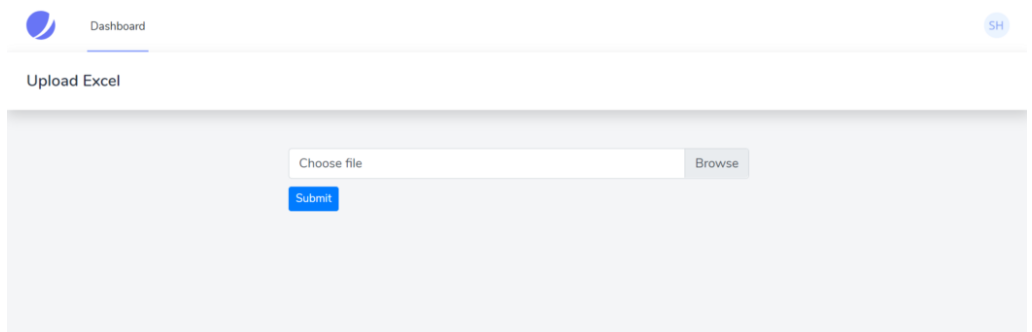
Note : Don’t forget to add enctype=”multipart/form-data”!


Once the user has submitted the file, we need a new router to process the file and send its content to the REST API. Let’s start by creating a Controller.


php artisan make:controller UploadController


Now in the web.php file,


Route::post('/upload', [UploadController::class, 'upload'])->name('upload')->middleware('auth');


In the UploadController.php , create a function named upload. We will be writing all the code inside this function. Also, we need an action for the form.


<form method="post" action="{{route('upload')}}" enctype="multipart/form-data">


Now inside the upload function, we need to get the submitted file and parse its contents.

Get the submitted file,


$file = $request->file('excel');


Parse the submitted file,


if (($handle = fopen($file, "r")) !== FALSE) { while (($data = fgetcsv($handle, 1000, ",")) !== FALSE) { ..... }

}


We will be using a dummy REST API to create users — https://reqres.in/api/users. This is the request body required to create a user.


{ "name": "test", "job": "test"

}


Keeping this in mind, we will create a sample .csv template to be submitted. The fields need to be two, namely Name and Job.


We need to send the values from this file as the request body to the API. So let’s add the code to loop through the content of this file.


if (($handle = fopen($file, "r")) !== FALSE) { while (($data = fgetcsv($handle, 1000, ",")) !== FALSE) { Http::post('https://reqres.in/api/users', [ 'name' => $data[0], 'job' => $data[1], ]); }

}


This will create each student for each row of the file. But we don’t need to send the data of the first row of the file.

Full code:


public function upload(Request $request){ $file = $request->file('excel'); if($file){ $row = 1; $array = []; if (($handle = fopen($file, "r")) !== FALSE) { while (($data = fgetcsv($handle, 1000, ",")) !== FALSE) { if($row > 1){ Http::post('https://reqres.in/api/users', [ 'name' => $data[0], 'job' => $data[1], ]); array_push($array,$data[0]); } $request->session()->flash('status', 'Users '.implode($array,", ").' created successfully!'); $row++; } } }else{ $request->session()->flash('error', 'Please choose a file to submit.'); } return view('dashboard');

}


This will post the data starting from the second row of the file, display a success message once the users are created, and an error message if the submit button is clicked without choosing a file.

Full template:


<div class="container max-w-7xl mx-auto sm:px-6 lg:px-8" style="width: 50%"> @if (session('status')) <div class="alert alert-success"> {{ session('status') }} </div> @endif @if (session('error')) <div class="alert alert-error"> {{ session('error') }} </div> @endif <form action="{{route('upload')}}" method="post" enctype="multipart/form-data"> @csrf <div class="custom-file"> <input type="file" accept=".csv" name="excel" class="custom-file-input" id="customFile" /> <label class="custom-file-label" for="customFile">Choose file</label> </div> <div> <button type="submit" class="btn btn-primary btn-sm" style="margin-top: 10px">Submit</button> </div> </form>

</div>



That’s it, thanks for reading :)
13691 views · 5 years ago
Web Sockets in PHP

In his talk Websockets in PHP, John Fransler walks us through the use of WebSockets in PHP.

While discussing bi-directional real-time application development, John notes that PHP is often not invited to the table due to its lack of native support. Of all the possible attempts to bring in PHP on this stage of real-time development, Ratchet, a PHP WebSocket library, comes closest. "Ratchet is a loosely coupled PHP library providing developers with tools to create real-time, bi-directional applications between clients and servers over WebSockets."* Ahem!

Today's dynamic world


In today's dynamic content world of the internet, it is required to serve real-time bi-directional messages between clients and servers. WebSockets are simple, full-duplex, and persistent. They work over Http and are a standard today.

WebSockets have compatibility with 96.5% of clients globally

There's a very high chance your client has the necessary plumbing to access your content via WebSockets. WebSockets gives the ability to have real-time data on to your clients without the need for polling.

To understand WebSockets, John takes an example of a Javascript client and Ratchet Server. Javascript has everything built in to allow access to a socket. For example, you can use the send method on a WebSocket variable to send a message to the server, or if you want to respond to a message from the server, you use the OnConnection method.

While on the Server, John uses Ratchet, which is built on React PHP. A server script is then configured and set up to run and listen on a port for incoming HTTP requests. For messages, JSON is used, and to find public methods, a router is set up. He then goes on to instantiate the server-side script in Ratchet.

There are four functions of a Ratchets message component interface that are used in this example:

OnOpen gets called when a new connection is made.

OnClose gets called when a client quits. It's essential to keep an eye on memory management, and essential to keep tidying up as you move through the code.

OnError gets called when there is an exception faced by the user.

OnMessage gives the text of the JSON message, which is being exchanged with the client.


For Initialization, Jason continues to walk through the example. He shows how one can loop through the clients, both inside the server and outside the server. Outside the server, it’s a feature of React PHP. On database access, and with traditional standard synchronous MySQL in PHP, what usually happens is that it forces the code to wait for the query to return a result and do nothing — Fortunately, with Asynchronous MySQLi, that is not the case.

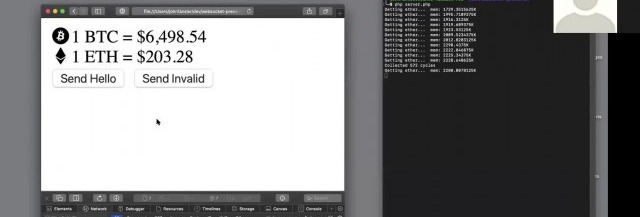
John gets into the details explaining Variables, References & Pointers. He also gives a demo where a central site has updated information on the Bitcoin and ether prices. A client terminal reflects the last values. Now the client doesn't have to poll the server for new values. When there is a change in the Bitcoin or ether values, the server pushes down the client's update. No polling helps with a lot of overheads and gets closer to real-time.

Using Supervisord


For Long-running applications - Jason recommends running a supervisord, use proxy to expose the port, and add a site certificate. Supervisord keeps an eye out for the server running the service; it can be used to restart the service and log any service issues. Recommended proxies are AWS load balancer, Nginx, and HA Proxy. For scalability, use multiple smaller WebSocket servers and a smaller number of clients per server used and load balancing. If one has to support a chat feature to allow clients to talk to each other in near real-time, it is recommended to use Redis. The Redis server proxies the messages between the server nodes.

The talk concludes with John summarizing best practices on error handling and takes QnA on various aspects of WebSockets such as handling load balancers and asynchronous calls to MSQLi.

The presentation for this video, along with the code, is hosted at John Curt's GitHub. More info about John's current areas of interest can be found on John's Blog.

Watch the video now


Related videos
8944 views · 5 years ago
Top 12 PHP Libraries to Leverage Your Web App Development


PHP, by all means, is an immensely powerful language!


We may fall short of words, but there won't come any end to its qualities. The endless functionalities and possibilities of this server-side scripting language have managed to get it a strong and supportive community of PHP programmers on a global level. At present, PHP powers more than half on websites and applications on the internet.


Do you know what makes PHP so praiseworthy?


It is the simplicity, easy programming structure, and developer-friendly web functionalities that are to be credited to turn PHP into one of the top programming languages. You can create highly interactive and dynamic websites and applications with desired results by making use of PHP.


However, coding often could be a tough and tedious task to accomplish. As a solution to this, you get built-in PHP libraries that optimize the process of coding for maximum productivity.


But what are these libraries?


That's exactly what you will find out as you move ahead in this article, a list of top 12 PHP libraries capable of leading the development process in an intended manner.


So, without waiting any further, let's move ahead to learn about PHP libraries in-depth.


PChart


PChart is a PHP library assisting with the generation of text data in the form of something more appealing to the eyes and known as visual charts.


You can use this library to represent data as bar charts, pie charts, and many more different formats. The PHP script here utilizes SQL queries to put data in the impressive charts or graphs form.


Mink


Another well-known in the list of PHP libraries is Mink. It allows you to keep an eye on if a proper interaction is happening between your web apps and the browser. Eliminating the API differences between the two types of browser emulators, Mink offers an authentic testing environment for you. It also supports PHPUnit, Behat, and Symfony2.


Monolog


Monolog is a PHP logging library that helps you with saving logs to the specified locations by sending them to set files, sockets, inboxes, databases, or other web services. The use of the PSR-3 interface permits to type-hint logs in counter to your libraries that maintain optimum interoperability.


Hoa


This modular, extensible, and structured set of PHP libraries we know as Hoa establishes a link between the research and the industry.


It recommends essential paradigms, mechanisms, and algorithms for building the reliability of a site. Many PHP developers in different parts of the world use Hoa for ideal PHP development.


Guzzle


Guzzle is an HTTP client library for PHP that enables you to send HTTP requests to combine with web services.


It offers a simple interface that makes the development of query strings, POST requests, HTTP cookies, and many other attributes possible. You can also use Guzzle to send synchronous and asynchronous requests from the similar interface.


Ratchet


If your need is to develop real-time, two-directional apps between clients and servers over WebSockets, Ratchet is the PHP library you need to do it effectively.


Creating event-driven apps with Ratchet is a rapid, simple, and easy job to do!


Geocoder


Geocoder is a library to create applications that are very well geo-aware.


With Geocoder, there is an abstraction layer that helps with geocoding manipulations.


It is further split into two parts, known as HttpAdapter and Provider.


ImageWorkshop


ImageWorkshop is an open-source PHP library letting you work over the manipulation of images with layers. You can crop, resize, add watermarks, create thumbnails, and so much more. You can also enhance the images on the sites.


PhpThumb


phpThumb is the library specialized at handling the work associated with creating thumbnails with minimal coding. Accepting every image source type and image formats, it makes you do a lot ranging from rotating or cropping to watermarking or defining the image quality.


Parody


This simple library we know as Parody is used to copy classes and objects. It also provides results for method calls, acquiring properties, instantiating objects, and more. Sequential method chaining is used by Parody to produce defining class structures.


Imagine


This object-oriented PHP library is meant for working with images along with manipulating them. The often adopted operations such as resizing, cropping, and applying filters happen instantly and relatively well with Imagine.


With Imagine, you get a color class that forms the RGB values of any given color. Draw shapes like arc, ellipse, line, etc. with the features available.


PhpFastCache


PhpFastCache is an open-source PHP library that makes caching feasible. Coming as a single-file, it can be integrated within a matter of minutes.


Caching methods supported by PhpFastCache involve apc, memcache, memcached, wincache, pdo, and mpdo.


The Bottom Line


It's not about what extra difference these libraries make; it's about what significant individual contributions these libraries make for a final desired PHP app or website.


A PHP programmer, too, agrees with these libraries' benefits.


It's your time now to try and believe!

SPONSORS