PHP & Web Development Blogs

Search Results For: building
Showing 1 to 5 of 17 blog articles.
22031 views · 7 years ago
Creating a Virus with PHP

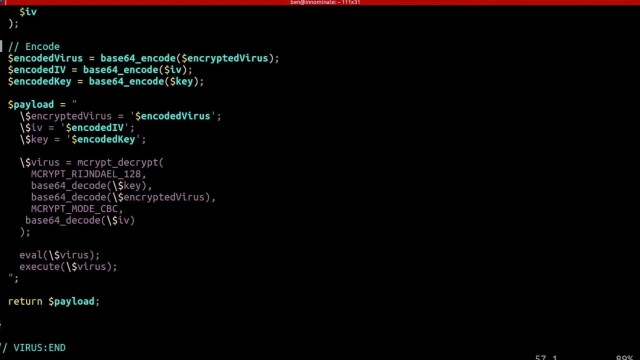
In his talk, “Writing Viruses for Fun, Not Profit,”Ben Dechrai (after making the viewer take a pledge to only use this knowledge for good and not evil) walks through how many viruses operate, and just how easy it is to build your own self-replicating virus in PHP.

The danger of many of these viruses according to Ben is that the most dangerous viruses often escape detection by not looking like a virus. Instead they encrypt their code to hide their true intent, while also constantly adapting and evolving.

Perhaps even more dangerously, they act like they’re benign and don’t actually do anything - often times laying dormant until called upon by the malicious actor.

Creating the Virus

What’s scary is just how simple it was for Ben to create such a virus, one that mutated ever so slightly as it infected every other file on the server. Opening up unlimited possibilities from scraping customer data, to DDOS attacks, to simply hijacking your domain.


But those attacks are just the start as Ben demonstrated how easy it is to write new files, delete files, eval() and execute foreign code - which could even be extended to accessing the underlying server itself if shell_exec() is enabled.

To add to the problem, Ben shares how challenging it can be to identify malicious code on your server as many of these attacks are far more sophisticated than the the virus he created in a matter of minutes - hiding themselves and often appearing as if they are part of the original source code.

Deploying the Virus

To drive his point home, Ben demonstrates how even seemingly secure systems can be vulnerable - as all it takes is one tiny misstep within your application.

He highlights this by building what should be a secure photo gallery - one that checks the extension and mime-type of the image - and even stores it outside of the public directory. He goes even farther by adding additional sanity checks with a PHP script that then renders the image.

After walking through the code and it’s security features, he then downloads a simple image from the internet. Opening his editor he quickly injects the virus (written in PHP) into the image and uploads it, passing all of the server checks.

Surely, since it passed these checks the system is secure, right? Ben loads the gallery to proudly show off the image - which is just that… an image, with nothing special or out of the ordinary.
Except that when he opens the image gallery files, each has been infected with the malicious code.

The culprit that allowed for Ben to hijack an entire system and execute foreign code, create new files, and even hijack the entire site? When displaying the image the file was included using PHP’s include() function, instead of pulling in the data using file_get_contents() and echoing it out.

Such a simple mistake provided Ben, if he was a malicious hacker, complete access to all of the files on the system.

Protecting Yourself

Security always exists in layers - and this could have been prevented by including a few more layers, such as using an open source library to rewrite the image, reviewing the image source before pulling it in, or again not giving it executable access by using the PHP include() function.

But what’s terrifying is how simple it is to hijack a site, how easy it is to get access to your system and private data, and how easy it is to overlook security vulnerabilities - especially with open source tooling and those that take plugins.

As Ben explains, sometimes the core code itself is really secure, but then you get two different plugins that when used together accidentally create a security vulnerability. That by itself is one of the most challenging as you can audit each plugin individually, and still not know you’re opening up your system to malicious actors.

This is why it's not just important to stay up to date on the latest security measures and best practices, but to be constantly thinking like a hacker and testing your code for vulnerabilities.

Learn More

You can watch thefull video to learn more how viruses operate, how to quickly build your own PHP virus (but you must promise to use it for good), and what to watch for in order to protect yourself, your customers, and your architecture.
8402 views · 2 years ago


For any development project to be successful, it’s important to choose the right technology and programming language. Most of the time, developers get confused about which programming language to choose.

Nowadays, PHP and Python have gained popularity among the programming languages for web development projects. However, choosing one between PHP vs Python is a difficult task. Recently, this has become a good topic for discussion.

Here, in this blog, we will compare the two popular programming languages: PHP vs Python. Let’s see which one turns out to be the best choice for web development.


What is Python?

Python is an open-source programming language developed in the year 1991 by Guido Van Rossum. It is one of the most commonly used languages due to its high level and easy-to-understand syntax.

According to the survey by Stack Overflow, Python is one of the most preferred programming languages. These Python app examples highlight its robustness and suitability for building scalable and innovative solutions across different platforms. Most of the companies and developers around the world are using Python web development.

What is PHP?

PHP or Hypertext Pre-processor, is an open-source server scripting language that is used for creating interactive and engaging web pages. This programming language comes with many features, libraries, plugins, and add-ons that increase community support and functionalities.

PHP language was developed by Rasmus Lerdorf in the year 1995. Earlier, PHP was named as Personal Home Page, which was later changed to Hypertext Pre-processor. An advantage of using PHP language is it supports all web browsers.

PHP is a practical, flexible, and fast programming language that can handle dynamic content on HTML sites, session tracking, and databases.

Features: PHP vs Python

PHP

* Open-source language, anyone can download and use it for free.
* PHP is easy to use and code than other programming languages.
* It is more efficient than other scripting languages like ASP and JSP.
* Offers access to log in by creating a summary of the recent user accesses.
* Provides database integration and supports distinct databases such as MySQL and Oracle.
* It has predefined error-reporting constants that generate warning or error messages.

Python

* Python is an easy-to-learn programming language.
* Provides an ideal structure and support for large applications.
* It can operate on different hardware platforms utilizing the same user interface.
* Python can be integrated with C, C++, and Java programming code.
* It’s easy to incorporate low-level modules in Python interpreter.
* Python offers high-level dynamic types of data and support for dynamic type checking.
* Its features support automatic garbage collection.
* It supports an interactive mode of testing and debugging.


Pros and Cons: PHP vs Python

Here, we will compare the pros and cons of PHP vs python for web development.

Pros of PHP

* Has a large ecosystem.
* Flexible and platform-independent.
* Several open-source PHP frameworks are available to use for free.
* Offers many pluggable frameworks, Open-source and object-oriented.
* Supports different database interfaces such as No SQL, PostgreSQL, and so on.
* It is supported by many operating systems and works cross-platform.
* Encourages top-notch debugging.
* Provides in-built SQL support.
* Offers support for database collection modules.
* It supports all operating systems like Windows, Linux, and UNIX.

Cons of PHP

* Delayed and wired performance.
* Not apt for content-based applications.
* Utilizes weak typing that can lead to false knowledge and data to users.
* Its core behavior can’t be changed.
* There’s no IOT alliance.
* Fewer security protocols and features.

Pros of Python

* Easy to learn and maintain.
* An open-source and uniformly unfolding language.
* Enables cross-platform code reusability.
* Object-oriented and versatile language to deploy.
* Offers WORA functionality.
* Helps in developing GUI apps.
* Has automatic garbage collection.
* It can be integrated easily with other languages, such as Java or C++.
* Provides libraries like Tenseorflow for math-intensive tasks.

Cons of Python

* Creates delays in web app testing.
* It utilizes an enormous amount of memory to help developers in easy development.
* Operates slower than other web development languages.
* Not of much use in mobile computing browsers and mobile app development.
* It has dynamic typing, which makes error detection more difficult.
* It’s too large for a simple and small app or website.
* Run time errors occurs due to duck typing.

When Should You Select PHP?

PHP is a commonly used server-side scripting language among developers. The best use cases in which you should select PHP:
* For developing blogs, websites, and web applications.
* Work effectively on the server side.
* Less investment.

When Should You Select Python?

* Python programming language has gained popularity in recent times. Below we have given some of the best cases in which you should choose Python.
* For operating in the areas of robotics and data science.
* When you want accurate and extensive data analytics.
* Developing websites using the Django framework.

Why opt for PHP?

Here, we will give you some reasons why you should opt for the PHP programming language.
* Open-source language, easy to download and use.
* Easy to learn and operates effectively on the server side.
* This scripting language can run on distinct platforms such as Windows, Mac OS X, Linux, and UNIX.
* It’s compatible with every server, like IIS, Apaches, and so on.
* Supports a broad range of databases.

Why opt for Python?

As you know, there are many advantages and disadvantages of using Python. Here, we will tell you why you should choose Python for web development.
* Python language is easy to use and maintain.
* Python syntax is quick to understand and debug as well. Therefore, its source code is easier to maintain.
* It has a garbage collection feature and memory addresses accordingly.
* It comes with many pre-built libraries.
* Python supports GUI apps such as Django, Tkinter, WXPython, etc.
* It’s a versatile and portable language. You can run Python on different types of operating systems or platforms.
* Python comes with a database-friendly interface that can store a colossal amount of data for commercial DBMS systems.
* It has an interactive shell that helps in unit testing before deploying a product.

Comparison: PHP vs Python

Above, we have given the features and pros & cons of PHP vs Python. In this section, we will give you a comparison between PHP vs Python in accordance with different parameters.

Parameters
Python
PHP
Release
    .
    .
Learning curve
Easier
Steep
Language type
Specialized for web development
General purpose programming language
Syntax
Clear & concise
Complex
Security
High
Medium
Readability
High
Low
Database connectivity
Faster
Slower
Debugging
Fast
Slower
Performance
Lesser support
Faster
Supported Frameworks
Flask, Django, Web2Py
Laravel, Zend, Codelgniter
GitHub Stars
    . 9k
    . 5k
TIOBE Rating
    . st position
    . th position
Forks
    . 5 k
    . 9k
Major Users
Instagram, YouTube, Quora, Reddit
Facebook, Yahoo, Flickr, Tumblr


This comprehensive comparison between PHP vs Python can help you to choose the right language for web development. Now, we will compare some other elements that would give you a clear picture of both PHP vs Python.

1. Ease of Learning

Python is an easier language to learn compared to PHP. If you are a beginner, then Python is a good choice as you can learn it quickly. Python programs are shorter as well as easy to write in comparison to other languages.

PHP programming language is made for creating sophisticated web apps. It’s not a general-purpose language, and it takes time to learn it.

2. Ease of Use

Python is an open-source programming language that is versatile and portable. Python’s syntax is simple, and coding is easy to learn compared to PHP. But PHP is not just an ordinary programming language it’s used for creating dynamic web pages with HTML. This makes PHP more difficult to use than Python.

3. Community Support

Both PHP and Python provide good community support. PHP has been in the market for a long time and has a large community of developers. Therefore, you can immediately get support if you opt for PHP.

However, there are even many Python developers who constantly develop python apps. So, the community support in Python is also good. Consequently, we can’t say whether PHP or Python is better at providing community support.

4. Flexibility

Nowadays, web apps backed by Machine Learning are in high demand. Also, ML is a significant part of Python. Python provides many machine-learning libraries, such as Tensorflow, Theano, Pandas, and Scikit-learn. Additionally, these libraries are rapid, unique, & robust and work effectively with a web framework.

Nonetheless, Python programming language can be used in many other fields apart from web development. But when it comes to PHP, it’s best for web development. Therefore, we can say Python is a better choice here.

Our skilled developers delivers the most promising web development firms to make dynamic websites for your business.

5. Speed to Market

Python provides a comprehensive set of modules and third-party libraries to help developers finish the project faster. One of the popular web frameworks written in Python is Django. It utilizes the MVC pattern to allow developers to create apps fast using a significant division of concerns and reusability.

PHP also has a vast set of tools, frameworks, and libraries. Laravel is a popular PHP framework that allows the MVC pattern. Additionally, it comes with many helpful functionalities for web development, like routing, templating, authentication, and so on.

6. Web Frameworks

You get robust and well-designed web development frameworks both in PHP and Python. Most of the big businesses utilize web frameworks that PHP provides. For example, Laravel and Symfony are mature web frameworks, and a huge community supports them. So, we can say PHP makes web development easy.

Python also has many exceptional frameworks that are highly scalable, easy to use, fast and secure. It’s two most popular web frameworks are Flask and Django. If you want a shorter development period, then you can choose Django over PHP-based frameworks.

7. Library Management

Python uses Pip to handle and deal with packages. Pip ensures that Python app development is easy, rapid, and meets development needs. Python has powerful library management compared to PHP. It has a wide range of packages and tools that assist and make web app development easier. So, in terms of library management, Python clearly wins it.

8. Security

When it comes to security, most businesses prefer using Python. For instance, Django offers many pre-built security features that aid in safeguarding the apps from distinct security breaches & threats.

Apart from that, many government organizations rely on Python as their secret hacking tool. Most of the security problems are addressed by its large community support. However, PHP is less strong than Python in aspects of security.

9. Environment Management

In terms of handling environments, Python is the best programming language. It has a Virtualenv system that aids in installing different versions of the language and switching between them immediately.
PHP has no comparison with Python when it comes to handling environments. There’s an analog of PHP, VirtPHP, but it’s archived and not maintained. Therefore, most of the developers opt for Python.

10. Debugging

Python has an in-built debugger called Python Debugger or PDB. It utilizes many debugging strategies. PDB enables dynamic typing and lets developers work effortlessly without stating things at the start of a program.
PHP also comes with an XDebug package for handling bugs and error-checking the codes. But PHP development is quite slow in identifying and removing bugs. Therefore, it often experiences security issues.


The Bottom Line PHP vs Python: Which One You Choose for Web Development?


From the blog, you must have inferred that both PHP and Python are good for web development. However, there are many aspects in which Python wins over PHP. But this doesn’t mean that you only have to opt for Python. The selection of programming language majorly depends on the complexity and needs of the project.

Sphinx Solutions is a leading and trusted web app development company. Our team of web developers can help you create the best web apps for your business based on your specifications. Schedule a call with our experts to get an estimation for your web app development project, or email us at [email protected].

PHP vs Python: FAQs

1. Why choose Python over PHP?
Python is chosen over PHP for web app development due to many reasons, such as ease to use, simple syntax, flexibility, security, high performance, etc.
2. Which programming language is secure: PHP vs Python?
Python is a preferred programming language when it comes to security as it has many security features compared to PHP.
3. Why is Python used mostly?
Python is a general-purpose programming language and is utilized in web development, mobile app development, AI, ML, game development, big data, and so on.
Browse More Related Article
    . React and Nodejs: The Best Combination for Web Application Development
    . A Timeless Guide on How to Expand Your Native App to a Web App
12846 views · 6 years ago


Welcome back! If you’re new to this series have a look at Part 1 here


Today’s focus is on templating, the aesthetic that will make or break your web application.

Having a clean design with well defined CSS that’s responsive and user friendly goes a long way.

Developers often stick to their lane but delving into templating will bode in your favor, you can indeed
create a functional and launch-worthy application all on your own!

Let’s jump into it!

Structured structure


Everything you tackle should be found with ease down the line. Therefore careful planning is fundamental to the success and sustainability of your project. You’ll also find that clearly defining your work lends itself to more productivity overall as you spend less that explaining your work during a handover / looking for a specific piece of code or resource. You’ll probably end up spending more time on actual work.
Finding your own unique pattern with file structure and CSS identifiers will also work in your favor as something unique to your process will most likely be easier to remember and form a tactile relationship with.

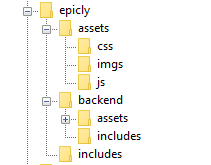
Our project’s current structure looks like this:


>If you need to backtrack, Part 1 is a great place to start!

In part 1, we created our index.php which displays info from our database.

Let’s take this a step further and create a header and a footer for our index.php

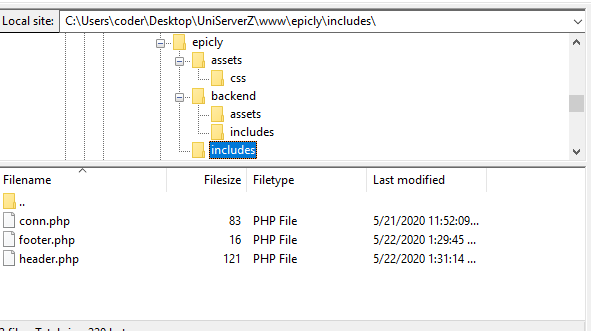
Create a file called header.php and save this to your includes folder.

Next, create a file called footer.php and save this to your includes folder.

Your file structure should now look like this.


A header above all the rest


The header file will be a file we reuse throughout your web application. This file will contain important information that’s vital to the functionality and aesthetic of your website.
The type of info you’ll expect to see in a header.php file:
Script includes
Such as JQuery and important libraries
CSS includes
CSS files loaded from internal or external sources
Meta information
Contains important information that’s readable by search engines.
The basic structure of the beginning of your app, including your menu, and your logo.
For now, how header is going to have a basic layout.

Let’s get our HTML on!

<html>
<head>
<title>My Awesome CMS – Page Title</title>
</head>
<body>


A footer that sets the bar

Create a file called footer.php and save it to your includes folder (yourcms/includes/footer.php).

Add this code to your new file.

</body>
</html>


Next, let’s focus on the gravy… The CSS


CSS, when written beautifully, can truly set you apart.

You can tell your web application to load various styles to specific elements by defining unique identifiers.
Styles that are only used once are denoted with a # (a CSS “ID”) whereas styles that are reused multiple times are denoted with a . (a CSS “class”)

The best way to delve into the realm of CSS is to learn by experience.

Let’s create!


First, we need to create and load our CSS file. Remember our nifty new pal header.php? This created a convenient way to load our CSS file!

Add the following code to your header.php just above the </head> tag.

<link href=”../assets/css/style.css” type=”text/css” rel=”stylesheet”/> 


The ../ in the link to our stylesheet means we have to leave the current directory (the directory that header.php is in) and look for the assets/css/ directories.

Go ahead and create the css folder under your assets folder.

Next we’re going to create some simple CSS to test things out.

It’s time to add some style!


We are going to create two divs.
A div is a divider / section in HTML.
Add this to your index.php (located in your CMS’ root folder) above the <?php tag.

<div id="myfirstid"></div>
<div class="myfirstclass"></div>


Then, create a CSS file

Add this:

#myfirstid{
Background:lightblue;
Font-family:Arial;
Font-size:44px;
Font-weight: Bold;
}
.myfirstclass{
Font-size:15px;
Color: darkblue;
}


Save your newly created CSS to assets/css/ as style.css.

Pulling it all together, let’s see what we can do!


Let’s apply what we just learned to our index.php. But first, we should add our header.php and footer.php files.

Including everyone


Add this to the top of your index.php file:

include(‘includes/header.php’);


Remove the <divs> we used for practice earlier, we have something better in store!

Add this to the bottom of your index.php:

include(‘includes/footer.php’);


Next, let’s modify our code so we can add some style to the data we retrieve from our database.

Modify the following line:
foreach($getmydata as $mydata){ echo "Title: "; echo $mydata['title']; echo "<br/>"; echo "Content: "; echo $mydata['content']; echo "<br/>"; echo "Author: "; echo $mydata['author']; echo "<br/>"; echo "<br/>";


as follows:
?>

<div id=”myfirstid”>
<?php
foreach($getmydata as $mydata){
echo "<div class=”myfirstclass”>Title: ";
echo $mydata['title'];
echo "<br/>";
echo "Content: ";
echo $mydata['content'];
echo "<br/>";
echo "Author: ";
echo $mydata['author'];
echo "</div><br/><br/>";
}?>
</div>
<?php


Your full index.php should now look like this:

<?php
include('includes/header.php');
include('includes/conn.php');

if ($letsconnect -> connect_errno) { echo "Error " . $letsconnect -> connect_error;

}else{

$getmydata=$letsconnect -> query("SELECT * FROM content");

?>
<div id="myfirstid">
<?php
foreach($getmydata as $mydata){
echo "<div class=”myfirstclass”>Title: ";
echo $mydata['title'];
echo "<br/>";
echo "Content: ";
echo $mydata['content'];
echo "<br/>";
echo "Author: ";
echo $mydata['author'];
echo "</div><br/><br/>";
}
?>
</div>
<?php
}

$letsconnect -> close();
include('includes/footer.php');
?>


Go ahead, test it out!

There’s a lot to unpack and I will break things down a little more during our next tutorial!

Challenge


Study the final index.php and try to form a few theories about why closing a php tag is necessary before adding raw html.

Next Up: #CodeWithMe Part 4: Building A Good Base

7113 views · 2 years ago


In the realm of web development, the Model-View-Controller (MVC) architectural pattern stands as one of the most influential paradigms. It provides a structured approach to designing web applications, promoting modularity, scalability, and maintainability. In this guide, we'll delve into the MVC framework in PHP, exploring its key components, principles, and benefits.

Understanding MVC Architecture:


MVC separates an application into three interconnected components, each with its distinct responsibility:

Model: The model represents the application's data and business logic. It encapsulates the data structure, database interactions, and validation rules. In MVC, the model is responsible for managing data persistence and state.

View: The view is responsible for presenting data to the user in a visually appealing format. It encompasses the HTML markup, CSS styling, and client-side scripting necessary to render the user interface. Views are typically passive components that receive data from the controller and display it to the user.

Controller: The controller acts as an intermediary between the model and the view. It processes user requests, invokes the appropriate methods in the model to retrieve or manipulate data, and selects the appropriate view to render the response. Controllers handle user input, orchestrate business logic, and coordinate the flow of data between the model and the view.

Implementing MVC Framework in PHP:


PHP offers a robust foundation for building MVC-based web applications. Let's explore how to implement each component of the MVC pattern in PHP:

Model:


In PHP, models typically represent data entities and interact with the database. They encapsulate data access logic and provide methods for querying, inserting, updating, and deleting records. Here's a simplified example of a model class:


class User {
public function getUserById($userId) {
}

public function updateUser($userId, $userData) {
}

}


View:


Views in PHP are responsible for generating HTML markup to render the user interface. They receive data from the controller and use it to dynamically generate the content displayed to the user. Views can include HTML templates with embedded PHP code or utilize template engines for better separation of concerns. Here's a basic example of a view:


<!DOCTYPE html>

<html>

<head> <title>User Profile</title>

</head>

<body> <h1>Welcome, <?php echo $user['username']; ?>!</h1> <p>Email: <?php echo $user['email']; ?></p>

</body>

</html>


Controller:


Controllers in PHP handle user requests, process input data, and interact with models to retrieve or manipulate data. They select the appropriate view to render the response and pass data to the view for presentation. Controllers are responsible for defining application routes and managing the overall application flow. Here's an example of a controller method:


class UserController {
public function profile($userId) {
$userModel = new User();
$userData = $userModel->getUserById($userId);

include 'views/profile.php';
}
}


Benefits of MVC Framework in PHP:

Separation of Concerns: MVC promotes a clear separation of concerns, making it easier to manage code complexity and maintainability.

Modularity: Components in MVC are modular and reusable, allowing developers to build and extend applications more efficiently.

Testability: With distinct components, it becomes easier to write unit tests for models, views, and controllers independently.

Scalability: MVC facilitates the scalability of web applications by enabling developers to add new features or modify existing ones without impacting other parts of the system.

Conclusion:


The MVC framework in PHP provides a robust architectural pattern for building scalable and maintainable web applications. By separating concerns into models, views, and controllers, developers can organize code more effectively, enhance testability, and streamline the development process. Whether you're building a simple blog or a complex enterprise application, leveraging the MVC pattern in PHP can significantly improve the quality and maintainability of your codebase.
13150 views · 2 years ago


In modern software architecture, developers are constantly exploring new paradigms to enhance the performance, scalability, and maintainability of their applications. One such architectural pattern gaining popularity is Command Query Responsibility Segregation (CQRS). CQRS separates the responsibility of handling read and write operations, offering numerous benefits in complex systems. In this article, we'll delve into CQRS and explore its implementation in PHP.

What is CQRS?


CQRS, coined by Greg Young, is an architectural pattern that segregates the responsibility for handling read and write operations in a system. In traditional CRUD-based architectures, the same model is often used for both reading and writing data. However, CQRS advocates for a clear distinction between commands (write operations that modify state) and queries (read operations that retrieve data).

Key Concepts of CQRS:
   

. Command: Commands represent actions that modify the state of the system. They encapsulate the intent to perform an operation, such as creating, updating, or deleting data.
   
. Query: Queries retrieve data from the system without modifying its state. They are read-only operations used to fetch information for presentation or analysis.
   
. Command Handler: Responsible for processing commands by executing the necessary business logic and updating the system's state accordingly.
   
. Query Handler: Handles queries by retrieving data from the appropriate data source and returning the results to the caller.
   
. Separate Models: CQRS often involves maintaining separate models for commands and queries. This allows each model to be optimized for its specific use case, leading to improved performance and scalability.

Implementing CQRS in PHP:


Implementing CQRS in PHP involves structuring your application to separate command and query responsibilities effectively. Here's a high-level overview of how to implement CQRS in PHP:

1. Define Commands and Queries:


Start by defining the commands and queries your application will support. Commands should encapsulate actions that modify state, while queries should retrieve data.

class CreateProductCommand {
public $name;
public $price;
}

class GetProductQuery {
public $productId;
}


2. Create Command and Query Handlers:


Next, implement handlers for processing commands and queries. Command handlers execute the necessary business logic to fulfill the command, while query handlers retrieve data based on the query criteria.

class CreateProductCommandHandler {
public function handle(CreateProductCommand $command) {
}
}

class GetProductQueryHandler {
public function handle(GetProductQuery $query) {
}
}


3. Use Separate Models:


Maintain separate models for commands and queries to optimize each for its specific purpose. This separation allows you to design models tailored to the needs of write and read operations.

class Product {
public $name;
public $price;
}

class ProductView {
public $name;
public $price;
}


4. Wiring Everything Together:


Finally, wire up your command and query handlers to the appropriate endpoints or controllers in your application. Dispatch commands to their respective handlers and invoke query handlers to retrieve data.

$command = new CreateProductCommand();
$command->name = "Example Product";
$command->price = 99.99;

$handler = new CreateProductCommandHandler();
$handler->handle($command);

$query = new GetProductQuery();
$query->productId = 123;

$handler = new GetProductQueryHandler();
$product = $handler->handle($query);


Benefits of CQRS in PHP:


-Improved Scalability: Separating read and write operations allows you to scale each independently based on demand.

-Enhanced Performance: Optimizing models and handlers for specific tasks can lead to improved performance and responsiveness.

-Simplified Maintenance: Clear separation of concerns makes the codebase easier to understand, maintain, and extend over time.

-Flexibility: CQRS enables flexibility in choosing the most suitable data storage and retrieval mechanisms for different use cases.

Conclusion:


CQRS is a powerful architectural pattern that offers numerous advantages for building complex and scalable PHP applications. By segregating command and query responsibilities, developers can achieve better performance, scalability, and maintainability in their systems. While implementing CQRS in PHP requires careful planning and design, the benefits it provides make it a compelling choice for projects requiring high performance and flexibility.

SPONSORS

The Ultimate Managed Hosting Platform