PHP & Web Development Blogs

Search Results For: functionality
Showing 1 to 5 of 9 blog articles.
8402 views · 2 years ago


For any development project to be successful, it’s important to choose the right technology and programming language. Most of the time, developers get confused about which programming language to choose.

Nowadays, PHP and Python have gained popularity among the programming languages for web development projects. However, choosing one between PHP vs Python is a difficult task. Recently, this has become a good topic for discussion.

Here, in this blog, we will compare the two popular programming languages: PHP vs Python. Let’s see which one turns out to be the best choice for web development.


What is Python?

Python is an open-source programming language developed in the year 1991 by Guido Van Rossum. It is one of the most commonly used languages due to its high level and easy-to-understand syntax.

According to the survey by Stack Overflow, Python is one of the most preferred programming languages. These Python app examples highlight its robustness and suitability for building scalable and innovative solutions across different platforms. Most of the companies and developers around the world are using Python web development.

What is PHP?

PHP or Hypertext Pre-processor, is an open-source server scripting language that is used for creating interactive and engaging web pages. This programming language comes with many features, libraries, plugins, and add-ons that increase community support and functionalities.

PHP language was developed by Rasmus Lerdorf in the year 1995. Earlier, PHP was named as Personal Home Page, which was later changed to Hypertext Pre-processor. An advantage of using PHP language is it supports all web browsers.

PHP is a practical, flexible, and fast programming language that can handle dynamic content on HTML sites, session tracking, and databases.

Features: PHP vs Python

PHP

* Open-source language, anyone can download and use it for free.
* PHP is easy to use and code than other programming languages.
* It is more efficient than other scripting languages like ASP and JSP.
* Offers access to log in by creating a summary of the recent user accesses.
* Provides database integration and supports distinct databases such as MySQL and Oracle.
* It has predefined error-reporting constants that generate warning or error messages.

Python

* Python is an easy-to-learn programming language.
* Provides an ideal structure and support for large applications.
* It can operate on different hardware platforms utilizing the same user interface.
* Python can be integrated with C, C++, and Java programming code.
* It’s easy to incorporate low-level modules in Python interpreter.
* Python offers high-level dynamic types of data and support for dynamic type checking.
* Its features support automatic garbage collection.
* It supports an interactive mode of testing and debugging.


Pros and Cons: PHP vs Python

Here, we will compare the pros and cons of PHP vs python for web development.

Pros of PHP

* Has a large ecosystem.
* Flexible and platform-independent.
* Several open-source PHP frameworks are available to use for free.
* Offers many pluggable frameworks, Open-source and object-oriented.
* Supports different database interfaces such as No SQL, PostgreSQL, and so on.
* It is supported by many operating systems and works cross-platform.
* Encourages top-notch debugging.
* Provides in-built SQL support.
* Offers support for database collection modules.
* It supports all operating systems like Windows, Linux, and UNIX.

Cons of PHP

* Delayed and wired performance.
* Not apt for content-based applications.
* Utilizes weak typing that can lead to false knowledge and data to users.
* Its core behavior can’t be changed.
* There’s no IOT alliance.
* Fewer security protocols and features.

Pros of Python

* Easy to learn and maintain.
* An open-source and uniformly unfolding language.
* Enables cross-platform code reusability.
* Object-oriented and versatile language to deploy.
* Offers WORA functionality.
* Helps in developing GUI apps.
* Has automatic garbage collection.
* It can be integrated easily with other languages, such as Java or C++.
* Provides libraries like Tenseorflow for math-intensive tasks.

Cons of Python

* Creates delays in web app testing.
* It utilizes an enormous amount of memory to help developers in easy development.
* Operates slower than other web development languages.
* Not of much use in mobile computing browsers and mobile app development.
* It has dynamic typing, which makes error detection more difficult.
* It’s too large for a simple and small app or website.
* Run time errors occurs due to duck typing.

When Should You Select PHP?

PHP is a commonly used server-side scripting language among developers. The best use cases in which you should select PHP:
* For developing blogs, websites, and web applications.
* Work effectively on the server side.
* Less investment.

When Should You Select Python?

* Python programming language has gained popularity in recent times. Below we have given some of the best cases in which you should choose Python.
* For operating in the areas of robotics and data science.
* When you want accurate and extensive data analytics.
* Developing websites using the Django framework.

Why opt for PHP?

Here, we will give you some reasons why you should opt for the PHP programming language.
* Open-source language, easy to download and use.
* Easy to learn and operates effectively on the server side.
* This scripting language can run on distinct platforms such as Windows, Mac OS X, Linux, and UNIX.
* It’s compatible with every server, like IIS, Apaches, and so on.
* Supports a broad range of databases.

Why opt for Python?

As you know, there are many advantages and disadvantages of using Python. Here, we will tell you why you should choose Python for web development.
* Python language is easy to use and maintain.
* Python syntax is quick to understand and debug as well. Therefore, its source code is easier to maintain.
* It has a garbage collection feature and memory addresses accordingly.
* It comes with many pre-built libraries.
* Python supports GUI apps such as Django, Tkinter, WXPython, etc.
* It’s a versatile and portable language. You can run Python on different types of operating systems or platforms.
* Python comes with a database-friendly interface that can store a colossal amount of data for commercial DBMS systems.
* It has an interactive shell that helps in unit testing before deploying a product.

Comparison: PHP vs Python

Above, we have given the features and pros & cons of PHP vs Python. In this section, we will give you a comparison between PHP vs Python in accordance with different parameters.

Parameters
Python
PHP
Release
    .
    .
Learning curve
Easier
Steep
Language type
Specialized for web development
General purpose programming language
Syntax
Clear & concise
Complex
Security
High
Medium
Readability
High
Low
Database connectivity
Faster
Slower
Debugging
Fast
Slower
Performance
Lesser support
Faster
Supported Frameworks
Flask, Django, Web2Py
Laravel, Zend, Codelgniter
GitHub Stars
    . 9k
    . 5k
TIOBE Rating
    . st position
    . th position
Forks
    . 5 k
    . 9k
Major Users
Instagram, YouTube, Quora, Reddit
Facebook, Yahoo, Flickr, Tumblr


This comprehensive comparison between PHP vs Python can help you to choose the right language for web development. Now, we will compare some other elements that would give you a clear picture of both PHP vs Python.

1. Ease of Learning

Python is an easier language to learn compared to PHP. If you are a beginner, then Python is a good choice as you can learn it quickly. Python programs are shorter as well as easy to write in comparison to other languages.

PHP programming language is made for creating sophisticated web apps. It’s not a general-purpose language, and it takes time to learn it.

2. Ease of Use

Python is an open-source programming language that is versatile and portable. Python’s syntax is simple, and coding is easy to learn compared to PHP. But PHP is not just an ordinary programming language it’s used for creating dynamic web pages with HTML. This makes PHP more difficult to use than Python.

3. Community Support

Both PHP and Python provide good community support. PHP has been in the market for a long time and has a large community of developers. Therefore, you can immediately get support if you opt for PHP.

However, there are even many Python developers who constantly develop python apps. So, the community support in Python is also good. Consequently, we can’t say whether PHP or Python is better at providing community support.

4. Flexibility

Nowadays, web apps backed by Machine Learning are in high demand. Also, ML is a significant part of Python. Python provides many machine-learning libraries, such as Tensorflow, Theano, Pandas, and Scikit-learn. Additionally, these libraries are rapid, unique, & robust and work effectively with a web framework.

Nonetheless, Python programming language can be used in many other fields apart from web development. But when it comes to PHP, it’s best for web development. Therefore, we can say Python is a better choice here.

Our skilled developers delivers the most promising web development firms to make dynamic websites for your business.

5. Speed to Market

Python provides a comprehensive set of modules and third-party libraries to help developers finish the project faster. One of the popular web frameworks written in Python is Django. It utilizes the MVC pattern to allow developers to create apps fast using a significant division of concerns and reusability.

PHP also has a vast set of tools, frameworks, and libraries. Laravel is a popular PHP framework that allows the MVC pattern. Additionally, it comes with many helpful functionalities for web development, like routing, templating, authentication, and so on.

6. Web Frameworks

You get robust and well-designed web development frameworks both in PHP and Python. Most of the big businesses utilize web frameworks that PHP provides. For example, Laravel and Symfony are mature web frameworks, and a huge community supports them. So, we can say PHP makes web development easy.

Python also has many exceptional frameworks that are highly scalable, easy to use, fast and secure. It’s two most popular web frameworks are Flask and Django. If you want a shorter development period, then you can choose Django over PHP-based frameworks.

7. Library Management

Python uses Pip to handle and deal with packages. Pip ensures that Python app development is easy, rapid, and meets development needs. Python has powerful library management compared to PHP. It has a wide range of packages and tools that assist and make web app development easier. So, in terms of library management, Python clearly wins it.

8. Security

When it comes to security, most businesses prefer using Python. For instance, Django offers many pre-built security features that aid in safeguarding the apps from distinct security breaches & threats.

Apart from that, many government organizations rely on Python as their secret hacking tool. Most of the security problems are addressed by its large community support. However, PHP is less strong than Python in aspects of security.

9. Environment Management

In terms of handling environments, Python is the best programming language. It has a Virtualenv system that aids in installing different versions of the language and switching between them immediately.
PHP has no comparison with Python when it comes to handling environments. There’s an analog of PHP, VirtPHP, but it’s archived and not maintained. Therefore, most of the developers opt for Python.

10. Debugging

Python has an in-built debugger called Python Debugger or PDB. It utilizes many debugging strategies. PDB enables dynamic typing and lets developers work effortlessly without stating things at the start of a program.
PHP also comes with an XDebug package for handling bugs and error-checking the codes. But PHP development is quite slow in identifying and removing bugs. Therefore, it often experiences security issues.


The Bottom Line PHP vs Python: Which One You Choose for Web Development?


From the blog, you must have inferred that both PHP and Python are good for web development. However, there are many aspects in which Python wins over PHP. But this doesn’t mean that you only have to opt for Python. The selection of programming language majorly depends on the complexity and needs of the project.

Sphinx Solutions is a leading and trusted web app development company. Our team of web developers can help you create the best web apps for your business based on your specifications. Schedule a call with our experts to get an estimation for your web app development project, or email us at [email protected].

PHP vs Python: FAQs

1. Why choose Python over PHP?
Python is chosen over PHP for web app development due to many reasons, such as ease to use, simple syntax, flexibility, security, high performance, etc.
2. Which programming language is secure: PHP vs Python?
Python is a preferred programming language when it comes to security as it has many security features compared to PHP.
3. Why is Python used mostly?
Python is a general-purpose programming language and is utilized in web development, mobile app development, AI, ML, game development, big data, and so on.
Browse More Related Article
    . React and Nodejs: The Best Combination for Web Application Development
    . A Timeless Guide on How to Expand Your Native App to a Web App
16031 views · 7 years ago
Working With Thin Controller And Fat Model Concept In Laravel

Models and controllers are one of the most essential programming handlers in the Laravel MVC framework, and both are used vastly for different functional operations. Models in Laravel are created inside the app folder and are mostly used to interact with the database using Eloquent ORM, while the controllers are located inside the directory App/Http/Controllers.

As a programmer, you should have the knowledge how to keep the balance in between the programming usage of Models and controllers. As which one should be more utilized for allowing functional tasks in applications deployed on any PHP MySQL hosting.


What is the Concept of Thin Controller and FAT Models


The concept of the thin controller and fat model is that we do less work in our controllers and more work in our models. Like we use our controllers to validate our data and then pass it to the models. While in models, we define our actual functional logic and main coding operations of the desired application. This code structuring process is also a very basic concept of MVC and also the differentiating factor from the conventional complex programming which we mistakenly ignore sometimes.


Why FAT Controllers Are Bad For Handling Code


Controllers are always meant to be defined short and concise, and it should only be used for receiving requests and return responses to it. Anything else further should be programmed in Models, which is actually made for main functional operations.

Placing functional logic in controllers can be bad for many reasons for your applications deployed on anyhosting for PHP. As it not only makes code structure long but also makes it complex sometimes. Further placing code in Controllers is also not recommended because if same functionality is needed somewhere else in route, then pulling out the whole code from their becomes difficult and so its reusability in the application.

Though Laravel is an MVC framework while developing on laravel, we sometimes ignore this and write mostly all our code including the extending of App\Model and all our functional logic in controller route methods. What we can do here is we can create a sub model of our parent model. For example, our parent model is User then we can create another sub model of username in CustomerModel if you are using the same User model for all types of users. In this model, we will write all the logic related to user type Customer.

So now let's take an example of my existing blog creating comment system with laravel and vuejs. In that article, you can see I have made so much mess in my controller methods. Mostly, I have written all my comments logic in my methods, so to shorten that let's clean them in this article. Inside app folder, I will create a new file with name CommentModel.php. Inside this file, I will write my whole logic for comment functions. This is my basic file:


<?php
namespace App;

use App\Comment;
use App\CommentVote;
use App\CommentSpam;
use App\User;
use Auth;

class CommentModel
{


}

?>


Right now it contains no function but has the reference of all my models which I required for this model. Let's first add a function namedgetallcomments passing$pageId as a parameter inside it. The function will get all the comments for the given page:


public function getAllComments($pageId)
{
$comments = Comment::where('page_id',$pageId)->get();

$commentsData = [];


foreach ($comments as $key) {
$user = User::find($key->users_id);
$name = $user->name;
$replies = $this->replies($key->id);
$photo = $user->first()->photo_url;
$reply = 0;
$vote = 0;
$voteStatus = 0;
$spam = 0;
if(Auth::user()){
$voteByUser = CommentVote::where('comment_id',$key->id)->where('user_id',Auth::user()->id)->first();
$spamComment = CommentSpam::where('comment_id',$key->id)->where('user_id',Auth::user()->id)->first();


if($voteByUser){
$vote = 1;
$voteStatus = $voteByUser->vote;
}

if($spamComment){
$spam = 1;
}
}


if(sizeof($replies) > 0){
$reply = 1;
}

if(!$spam){
array_push($commentsData,[
"name" => $name,
"photo_url" => (string)$photo,
"commentid" => $key->id,
"comment" => $key->comment,
"votes" => $key->votes,
"reply" => $reply,
"votedByUser" =>$vote,
"vote" =>$voteStatus,
"spam" => $spam,
"replies" => $replies,
"date" => $key->created_at->toDateTimeString()
]);
}


}
$collection = collect($commentsData);
return $collection->sortBy('votes');
}


Now I will create another function namedreplies which takes$commentId as a parameter. The function is more or less programmed in the same manner as the upper function get all comments.


protected function replies($commentId)
{
$comments = Comment::where('reply_id',$commentId)->get();
$replies = [];


foreach ($comments as $key) {
$user = User::find($key->users_id);
$name = $user->name;
$photo = $user->first()->photo_url;

$vote = 0;
$voteStatus = 0;
$spam = 0;


if(Auth::user()){
$voteByUser = CommentVote::where('comment_id',$key->id)->where('user_id',Auth::user()->id)->first();
$spamComment = CommentSpam::where('comment_id',$key->id)->where('user_id',Auth::user()->id)->first();

if($voteByUser){
$vote = 1;
$voteStatus = $voteByUser->vote;
}

if($spamComment){
$spam = 1;
}
}
if(!$spam){


array_push($replies,[
"name" => $name,
"photo_url" => $photo,
"commentid" => $key->id,
"comment" => $key->comment,
"votes" => $key->votes,
"votedByUser" => $vote,
"vote" => $voteStatus,
"spam" => $spam,
"date" => $key->created_at->toDateTimeString()
]);
}


}


$collection = collect($replies);
return $collection->sortBy('votes');
}


Now lets create a functioncreate comment which passes$array as a parameter in it:


public function createComment($arary)
{
$comment = Comment::create($array);


if($comment)
return [ "status" => "true","commentId" => $comment->id ];
else
return [ "status" => "false" ];
}


Similarly, Now I will create all the function for comment in myCommentModel, so that all the functions gets accumulated in one model.


<?php
namespace App;

use App\Comment;
use App\CommentSpam;
use App\CommentVote;
use App\User;
use Auth;

class CommentModel
{
public function getAllComments($pageId)
{
$comments = Comment::where('page_id', $pageId)->get();

$commentsData = [];

foreach ($comments as $key) {
$user = User::find($key->users_id);
$name = $user->name;
$replies = $this->replies($key->id);
$photo = $user->first()->photo_url;
$reply = 0;
$vote = 0;
$voteStatus = 0;
$spam = 0;
if (Auth::user()) {
$voteByUser = CommentVote::where('comment_id', $key->id)->where('user_id', Auth::user()->id)->first();
$spamComment = CommentSpam::where('comment_id', $key->id)->where('user_id', Auth::user()->id)->first();

if ($voteByUser) {
$vote = 1;
$voteStatus = $voteByUser->vote;
}

if ($spamComment) {
$spam = 1;
}
}

if (sizeof($replies) > 0) {
$reply = 1;
}

if (!$spam) {
array_push($commentsData, [
"name" => $name,
"photo_url" => (string) $photo,
"commentid" => $key->id,
"comment" => $key->comment,
"votes" => $key->votes,
"reply" => $reply,
"votedByUser" => $vote,
"vote" => $voteStatus,
"spam" => $spam,
"replies" => $replies,
"date" => $key->created_at->toDateTimeString(),
]);
}

}
$collection = collect($commentsData);
return $collection->sortBy('votes');
}

protected function replies($commentId)
{
$comments = Comment::where('reply_id', $commentId)->get();
$replies = [];

foreach ($comments as $key) {
$user = User::find($key->users_id);
$name = $user->name;
$photo = $user->first()->photo_url;

$vote = 0;
$voteStatus = 0;
$spam = 0;

if (Auth::user()) {
$voteByUser = CommentVote::where('comment_id', $key->id)->where('user_id', Auth::user()->id)->first();
$spamComment = CommentSpam::where('comment_id', $key->id)->where('user_id', Auth::user()->id)->first();

if ($voteByUser) {
$vote = 1;
$voteStatus = $voteByUser->vote;
}

if ($spamComment) {
$spam = 1;
}
}
if (!$spam) {

array_push($replies, [
"name" => $name,
"photo_url" => $photo,
"commentid" => $key->id,
"comment" => $key->comment,
"votes" => $key->votes,
"votedByUser" => $vote,
"vote" => $voteStatus,
"spam" => $spam,
"date" => $key->created_at->toDateTimeString(),
]);
}

}

$collection = collect($replies);
return $collection->sortBy('votes');
}

public function createComment($arary)
{
$comment = Comment::create($array);

if ($comment) {
return ["status" => "true", "commentId" => $comment->id];
} else {
return ["status" => "false"];
}

}

public function voteComment($commentId, $array)
{
$comments = Comment::find($commentId);
$data = [
"comment_id" => $commentId,
'vote' => $array->vote,
'user_id' => $array->users_id,
];

if ($array->vote == "up") {
$comment = $comments->first();
$vote = $comment->votes;
$vote++;
$comments->votes = $vote;
$comments->save();
}

if ($array->vote == "down") {
$comment = $comments->first();
$vote = $comment->votes;
$vote--;
$comments->votes = $vote;
$comments->save();
}

if (CommentVote::create($data)) {
return true;
}

}

public function spamComment($commentId, $array)
{
$comments = Comment::find($commentId);

$comment = $comments->first();
$spam = $comment->spam;
$spam++;
$comments->spam = $spam;
$comments->save();

$data = [
"comment_id" => $commentId,
'user_id' => $array->users_id,
];

if (CommentSpam::create($data)) {
return true;
}

}
}
?>


Now we have all our required methods inCommentModel. So now let's clean upCommentController which is currently bit complex and lengthy in code structure. As right nowCommentController look like this:


<?php

namespace App\Http\Controllers;

use Illuminate\Http\Request;
use App\Http\Requests;
use App\Comment;
use App\CommentVote;
use App\CommentSpam;
use App\User;
use Auth;

class CommentController extends Controller
{


public function index($pageId)
{
$comments = Comment::where('page_id',$pageId)->get();

$commentsData = [];


foreach ($comments as $key) {
$user = User::find($key->users_id);
$name = $user->name;
$replies = $this->replies($key->id);
$photo = $user->first()->photo_url;
$reply = 0;
$vote = 0;
$voteStatus = 0;
$spam = 0;
if(Auth::user()){
$voteByUser = CommentVote::where('comment_id',$key->id)->where('user_id',Auth::user()->id)->first();
$spamComment = CommentSpam::where('comment_id',$key->id)->where('user_id',Auth::user()->id)->first();


if($voteByUser){
$vote = 1;
$voteStatus = $voteByUser->vote;
}

if($spamComment){
$spam = 1;
}
}


if(sizeof($replies) > 0){
$reply = 1;
}

if(!$spam){
array_push($commentsData,[
"name" => $name,
"photo_url" => (string)$photo,
"commentid" => $key->id,
"comment" => $key->comment,
"votes" => $key->votes,
"reply" => $reply,
"votedByUser" =>$vote,
"vote" =>$voteStatus,
"spam" => $spam,
"replies" => $replies,
"date" => $key->created_at->toDateTimeString()
]);
}


}
$collection = collect($commentsData);
return $collection->sortBy('votes');
}

protected function replies($commentId)
{
$comments = Comment::where('reply_id',$commentId)->get();
$replies = [];


foreach ($comments as $key) {
$user = User::find($key->users_id);
$name = $user->name;
$photo = $user->first()->photo_url;

$vote = 0;
$voteStatus = 0;
$spam = 0;


if(Auth::user()){
$voteByUser = CommentVote::where('comment_id',$key->id)->where('user_id',Auth::user()->id)->first();
$spamComment = CommentSpam::where('comment_id',$key->id)->where('user_id',Auth::user()->id)->first();

if($voteByUser){
$vote = 1;
$voteStatus = $voteByUser->vote;
}

if($spamComment){
$spam = 1;
}
}
if(!$spam){


array_push($replies,[
"name" => $name,
"photo_url" => $photo,
"commentid" => $key->id,
"comment" => $key->comment,
"votes" => $key->votes,
"votedByUser" => $vote,
"vote" => $voteStatus,
"spam" => $spam,
"date" => $key->created_at->toDateTimeString()
]);
}


}


$collection = collect($replies);
return $collection->sortBy('votes');
}


public function store(Request $request)
{
$this->validate($request, [
'comment' => 'required',
'reply_id' => 'filled',
'page_id' => 'filled',
'users_id' => 'required',
]);
$comment = Comment::create($request->all());
if($comment)
return [ "status" => "true","commentId" => $comment->id ];
}


public function update(Request $request, $commentId,$type)
{
if($type == "vote"){


$this->validate($request, [
'vote' => 'required',
'users_id' => 'required',
]);

$comments = Comment::find($commentId);
$data = [
"comment_id" => $commentId,
'vote' => $request->vote,
'user_id' => $request->users_id,
];

if($request->vote == "up"){
$comment = $comments->first();
$vote = $comment->votes;
$vote++;
$comments->votes = $vote;
$comments->save();
}

if($request->vote == "down"){
$comment = $comments->first();
$vote = $comment->votes;
$vote--;
$comments->votes = $vote;
$comments->save();
}

if(CommentVote::create($data))
return "true";
}

if($type == "spam"){


$this->validate($request, [
'users_id' => 'required',
]);

$comments = Comment::find($commentId);


$comment = $comments->first();
$spam = $comment->spam;
$spam++;
$comments->spam = $spam;
$comments->save();

$data = [
"comment_id" => $commentId,
'user_id' => $request->users_id,
];

if(CommentSpam::create($data))
return "true";
}
}


public function destroy($id)
{
}
}?>


After cleaning up the controller it will look much simpler and easy to understand like this:


<?php

namespace App\Http\Controllers;

use App\CommentModel;
use Illuminate\Http\Request;

class CommentController extends Controller
{

private $commentModel = null;
private function __construct()
{
$this->commentModel = new CommentModel();
}


public function index($pageId)
{
return $this->commentModel->getAllComments($pageId);
}


public function store(Request $request)
{
$this->validate($request, [
'comment' => 'required',
'reply_id' => 'filled',
'page_id' => 'filled',
'users_id' => 'required',
]);
return $this->commentModel->createComment($request->all());
}


public function update(Request $request, $commentId, $type)
{
if ($type == "vote") {

$this->validate($request, [
'vote' => 'required',
'users_id' => 'required',
]);

return $this->commentModel->voteComment($commentId, $request->all());
}

if ($type == "spam") {

$this->validate($request, [
'users_id' => 'required',
]);

return $this->commentModel->spamComment($commentId, $request->all());
}
}

}
?>



Wrap Up!


So Isn't it looking much cleaner and simpler to understand now? This is what actually a thin controller and fat model looks like. We have all our logic related to Comment system programmed in ourCommentModel and our controller is now just used to transfer data from the user to our model and returning the response which is coming from our model.

So this is how the structuring of the thin controller and fat model is made. Give your thoughts in the comments below.
10346 views · 7 years ago
Iterator in PHP

Every time I see this
$users = [new User(), new User()];

I see a lost opportunity to use Iterator.

Why Iterators?

Collections are an awesome way to organize your previously no-named array. There is a couple of reasons why you should use iterators. One of reason stays for behavior, you can specify exact behavior on standard calls such as next, current, valid etc. Other reason could be that you want to ensure that collection contains an only specific type of an object.

Understand a suffer from using an array of unknown value types.
Very common in the PHP world arrays are used to store all kind of data, in many dimensions in many nested forms. Arrays introduced infinite flexibility to the developer, but because of that, they become very evil.

Example:

- Your function (getUsers) returns an array of User objects.
- Another function (setUsersToActiveState) using getUsers output array and set all users active status to true.
- setUsersToActiveState loop through the array and expect to call a specific method on array item. For example, the method name is getActiveStatus.
- If given array is an array of desired objects which have a callable method getActiveStatus, all fine. But if not exception will be thrown.
- How we can ensure that given array is always an array of objects of a specific type?

public function getUsers(): array
{

return $userArray;
}

public function setUsersToActiveState()
{
$users = $this->getUsers();

foreach ($users as $user) {
if(!$user->getActiveStatus()) {
$user->setActiveStatus(true);
}
}
}

There immediately two problems occurred.
    . One is the problem of type. Our IDE doesn't know what's inside array of $users, so because of that IDE can't suggest us how to use $user element. (I put this comment block above foreach, it works for phpStorm and I guess for some other IDEs)
    . Your colleagues! How they possibly know what's inside array if there is no any hint.
    . Bonus problem, getUsers can return literally any array and there won't be warning in the system.

Solution


class UsersCollection implements \IteratorAggregate
{

private $users = [];

public function getIterator() : UserIterator
{
return new UserIterator($this);
}

public function getUser($position)
{
if (isset($this->users[$position])) {
return $this->users[$position];
}

return null;
}

public function count() : int
{
return count($this->users);
}

public function addUser(User $users)
{
$this->users[] = $users;
}
}

class UserIterator implements \Iterator
{

private $position = 0;


private $userCollection;

public function __construct(UsersCollection $userCollection)
{
$this->userCollection = $userCollection;
}

public function current() : User
{
return $this->userCollection->getUser($this->position);
}

public function next()
{
$this->position++;
}

public function key() : int
{
return $this->position;
}

public function valid() : bool
{
return !is_null($this->userCollection->getUser($this->position));
}

public function rewind()
{
$this->position = 0;
}
}

Tests

Off course there is the tests to ensure that our Collection and Iterator works like a charm. For this example I using syntax for PHPUnit framework.

class UsersCollectionTest extends TestCase
{

public function testUsersCollectionShouldReturnNullForNotExistingUserPosition()
{
$usersCollection = new UsersCollection();

$this->assertEquals(null, $usersCollection->getUser(1));
}


public function testEmptyUsersCollection()
{
$usersCollection = new UsersCollection();

$this->assertEquals(new UserIterator($usersCollection), $usersCollection->getIterator());

$this->assertEquals(0, $usersCollection->count());
}


public function testUsersCollectionWithUserElements()
{
$usersCollection = new UsersCollection();
$usersCollection->addUser($this->getUserMock());

$this->assertEquals(new UserIterator($usersCollection), $usersCollection->getIterator());
$this->assertEquals($this->getUserMock(), $usersCollection->getUser(1));
$this->assertEquals(2, $usersCollection->count());
}

private function getUserMock()
{
}
}


class UserIteratorTest extends MockClass
{

public function testCurrent()
{
$iterator = $this->getIterator();
$current = $iterator->current();

$this->assertEquals($this->getUserMock(), $current);
}


public function testNext()
{
$iterator = $this->getIterator();
$iterator->next();

$this->assertEquals(1, $iterator->key());
}


public function testKey()
{
$iterator = $this->getIterator();

$iterator->next();
$iterator->next();

$this->assertEquals(2, $iterator->key());
}


public function testValidIfItemInvalid()
{
$iterator = $this->getIterator();

$iterator->next();
$iterator->next();
$iterator->next();

$this->assertEquals(false, $iterator->valid());
}


public function testValidIfItemIsValid()
{
$iterator = $this->getIterator();

$iterator->next();

$this->assertEquals(true, $iterator->valid());
}


public function testRewind()
{
$iterator = $this->getIterator();

$iterator->rewind();

$this->assertEquals(0, $iterator->key());
}

private function getIterator() : UserIterator
{
return new UserIterator($this->getCollection());
}

private function getCollection() : UsersCollection
{
$userItems[] = $this->getUserMock();

$usersCollection = new UsersCollection();

foreach ($userItems as $user) {
$usersCollection->addUser($user);
}

return $usersCollection;
}

private function getUserMock()
{
}
}


Usage


public function getUsers(): UsersCollection
{
$userCollection = new UsersCollection();

foreach ($whatIGetFromDatabase as $user) {
$userCollection->addUser($user);
}
return $userCollection;
}

public fucntion setUsersToActiveState()
{
$users = $this->getUsers();

foreach ($users as $user) {
if(!$user->getActiveStatus()) {
$user->setActiveStatus(true);
}
}
}

As you can see setUsersToActiveState remains the same, we only do not need to specify for our IDE or collagues what type $users variable is.

Extending functionalities

Believe or not you can reuse this two objects and just change names of variables to fit most of the needs. But if you want any more complex functionality, than feel free to add it in iterator or collection.

Example 1


For example, let's say that userCollection accepts only users with age more than 18. Implementation will happen in UsersCollection class in the method addUser.

 public function addUser(User $users)
{
if ($user->getAge() > 18) {
$this->users[] = $users;
}
}

Example 2

You need to add bulk users. Then you can expand your userCollection with additional method addUsers and it might look like this.

public function addUsers(array $users)
{
foreach($users as $user) {
$this->addUser(User $users);
}
}

16574 views · 6 years ago


It took me quite some time to settle on my first blog post in this series and I found myself thinking about the most requested functionality in my career – The good ‘ol Custom CMS – typically geared towards clients that want a straight forward, secure solution that can be expanded upon in a modular format and that’s their IP.

This will be our starting point. A blank slate to build something epic with clean code and even cleaner design. And in the spirit of building from scratch, I will refrain from using classes or a framework. The main reasoning behind this is to truly get everyone acquainted with and excited about PHP development.

Join me as I transform rudimentary code into something extraordinary that can be morphed into just about any Content, PHP, and MySQL driven project. So without further ado, let’s jump into it!

The bare necessities


If you’re just getting started with development, there’s a nifty bite sized server called UniformServer that will be your best friend throughout your coding career. PHPMyAdmin (an awesome visual db management tool) comes built in so if you’re looking for a work right out of the box solution, this is it.

Alternatively, you can opt for XAMPP or use an alternative server of your choice.

Now here’s where the exciting stuff begins, mapping things out.


I don’t see this done/encouraged often enough. Feel free to grab a piece of paper to logically map out your steps or produce a rough draft of where you’d like this project to go.

In this tutorial, I would like to achieve the following:


DB, DB, Set up your DB.


This requires a bit of planning but let’s start of with the basic structure we need to see this through.

We are going to need a user table and a content table and are a few ways to tackle this.

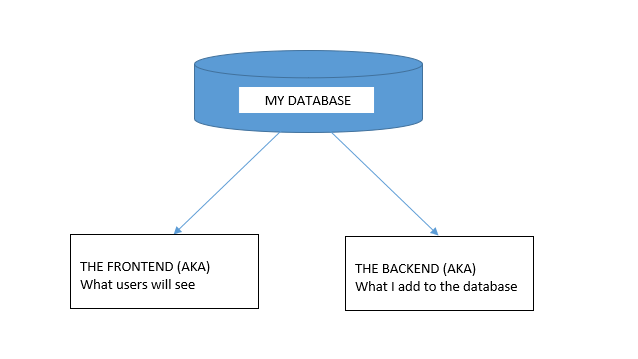
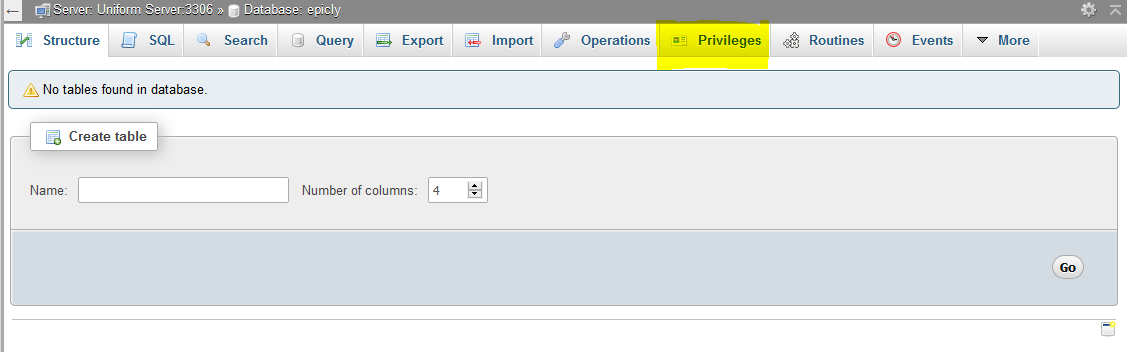
If you’re using the PHPMyAdmin tool you can create your database, add user permissions (Click on Permissions after creating your database), and create a table with ease.


If you’re like me and prefer to look at good ‘ol SQL then writing an SQL statement is the preferred approach.


CREATE TABLE <code>mydbname</code>.<code>content</code> ( <code>ID</code> INT(11) NOT NULL AUTO_INCREMENT , <code>title</code> VARCHAR(100) NOT NULL , <code>content</code> LONGTEXT NOT NULL , <code>author</code> VARCHAR(50) NOT NULL , PRIMARY KEY (<code>ID</code>)) ENGINE = MyISAM COMMENT = 'content table';

Understanding the SQL statement

In a nutshell we are creating a table with important fields. Namely:

####

ID | Title | Content | Author

#######

The ID field is our unique identifier.Now we can move on to the file structure.

Everything has a place in the file structure game


You can use a structure that speaks to your coding style / memory.

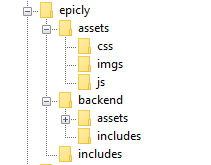
I tend to use the following:


Choose a name for your CMS, which should be placed at the webroot of your localhost/server.

Replicate the folder structure as per the above example.

Next, we’re going to create a basic connection file.


You can create a conn.php file in your root/includes folder.

The connection file will provide crucial information to connect to the database.

Type the following into your conn.php file, remember to include your own database credentials.


<?php

$letsconnect = new mysqli("localhost","dbuser","dbpass","dbname");

?>


Let’s go to the homepage (index.php)


Create a file called index.php at the root of your CMS folder.

I will be adding comments in my code to help you understand what each line does.

Comments are a useful tool for developers to add important notes private to their code.

We need to pull information from the database so it’s imperative that we include our connection file.


<?php

include('includes/conn.php');

if ($letsconnect -> connect_errno) { echo "Error " . $letsconnect -> connect_error;

}else{

$getmydata=$letsconnect -> query("SELECT * FROM content");

foreach($getmydata as $mydata){ echo "Title: "; echo $mydata['title']; echo "<br/>"; echo "Content: "; echo $mydata['content']; echo "<br/>"; echo "Author: "; echo $mydata['author']; echo "<br/>"; echo "<br/>";

}

}

$letsconnect -> close();

?>


Let’s get a (very) basic backend up and running


Create a file called index.php in your backend folder.

We need to create a basic form to capture our data.

Let’s code some HTML!


<html>

<head><title>Backend - Capture Content</title></head>

<body>

<form action="<?php $_SERVER[‘PHP_SELF’];?>" method="post">

<input type="text" name="title" placeholder="Content Title here" required/>

<textarea name="content">Content Here</textarea>

<input type="text" name="author" placeholder="Author" required/>

<input type="submit" value="Save My Data" name="savedata"/>

</form>

</body>

</html>


Next, we need to process the form data.


Type the following just above the
<form> 
tag.


<?php

if(isset($_POST['savedata'])){

include('../includes/conn.php');

if ($letsconnect->connect_error) {

die("Your Connection failed: " . $letsconnect->connect_error);

}else{

$sql = "INSERT INTO content(title,content,author)VALUES ('".$_POST["title"]."', '".$_POST["content"]."', '".$_POST["author"]."')";

if (mysqli_query($letsconnect, $sql)) {

echo "Your data was saved successfully!";

} else { echo "Error: " . $sql . "" . mysqli_error($letsconnect);

} $letsconnect->close();

}

}

?>


Note, this is a basic MySQL query to insert data. However, before using this in production it's important to add proper escaping and security to prevent SQL injections. This will be covered in the next article.


Congrats you made it to the end of tutorial 1!


Test out your creation, modify your content, and play around.

Go to your sitename/index.php to see your frontend after capturing data via sitename/backend/index.php

Next Up:


codewithme Now With Security, Functionality, and Aesthetics in mind.


Conclusion


Coding doesn’t have to be daunting and it’s my aim to divide a complex system into bitesized tutorials so you can truly use the knowledge you’ve acquired in your own projects.
13178 views · 6 years ago


Welcome back!, if you’re new please be sure to read Part 1 here.


This tutorial will focus primarily on Security and will touch on how to plan functionality.

Planning out an application and seeing progress regularly is a good strategy as you are most likely to complete your tasks in a timely fashion with this approach.

Ready?, ok let’s jump into it!

DISCLAIMER


We highly recommend that you follow these tutorials on a localhost testing server like Uniserver. Read through Part 1 here to look at our recommendations. These tutorials follow a phased approach and it is highly recommended that you do not make snippets of code live prior to completing this tutorial series.
Where we left off – the serious stuff.


In the previous tutorial we saved variables to the database.

It’s important to note that further steps are needed to ensure that data transactions to / from the database are secure.

A great first step is to ensure that all POST data (data transmitted after a user clicks a form’s submit button) is sanitized.

What we’re trying to prevent


One of the most common exploits is SQL Injection, an attack most commonly used to insert SQL into db queries. POST data that’s not sanitized leaves a huge security hole for malicious exploits. In some cases SQL injection can be leveraged to rage an all out assault on a server’s operating system.

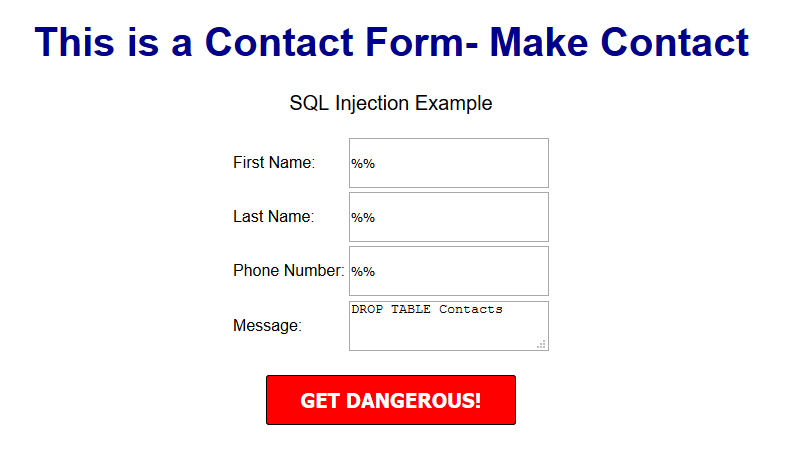
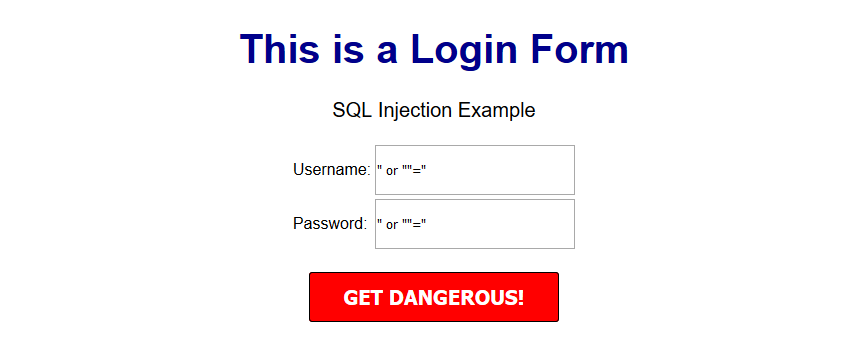
A few examples of a basic version of what this might look like can be seen below.


OUTCOME


This might delete your database table


OUTCOME


This might provide access to the entire user table and the password protected area/dashboard.


***Please note that there are various types of SQL injection techniques and I will delve into this during the course of this series.***


So what exactly is sanitization and what does it do?


When sanitizing POST data, we are essentially looking for any special characters that are often used in SQL injection attacks.

In many ways, this tiny piece of code is the unsung superhero of many database driven applications.

Let’s secure that POST data!


Navigate to your backend folder and open index.php

Locate the following line of code:

$sql = "INSERT INTO content(title,content,author)VALUES ('".$_POST["title"]."', '".$_POST["content"]."', '".$_POST["author"]."')";


Ok, let’s get to work.

Based on what I mentioned a few moments ago, it’s clear that our SQL statement is vulnerable so we need to sanitize the POST data pronto!

The method I will focus on first is $mysqli->real_escape_string. This will escape any special characters found in the POST data.

Add the following just above your $sql.

$title = $letsconnect -> real_escape_string($_POST['title']);

$content = $letsconnect -> real_escape_string($_POST['content']);

$author = $letsconnect -> real_escape_string($_POST['author']);


Did you notice the use of $letsconnect? This was used because of our db connection defined in conn.php.

Our new query will look like this:

$sql = "INSERT INTO content (title,content,author) VALUES ('".$title."', '".$content."', '".$author."')";


Go ahead and replace the old $sql.

Phew!, we can breathe easy now.

Next, let’s lighten things up a bit by focusing on functionality and aesthetics.


A phased approach is the best way to tackle projects of any size.

I tend to jot this down on paper before creating a more legible professional spec!.

Typically the phased approach lends itself to logical progression.

For example, over the next several days I will go over the following:

* Account Access
* The login process
* The registration process
* The password recovery process
* Frontend
* The look and feel
* Menus
* Sidebars
*Main Content
*Footer
* Backend
* Content Management
* Add/Edit/Delete
* Security

This will give us a good springboard to delve into more complex functionality.

The aesthetic I have in mind will be barebones at first with clean CSS practices (this will make life a whole lot easier when we have to make changes down the line!).

Challenge :


Plan out your own CMS, think about the user interface and design choices you’d like to implement, and create a phased approach.

Conclusion


I hope this tutorial encouraged you to think about security and understand one of the most common exploits. During the course of this series, you will receive the tools necessary to beef up security while maintaining your sanity!

Next up


CodeWithMe – Let’s go templating.

SPONSORS

PHP Tutorials and Videos