PHP & Web Development Blogs

Search Results For: libraries
Showing 6 to 10 of 11 blog articles.
13454 views · 6 years ago


Welcome back! If you’re new to this series have a look at Part 1 here


Today’s focus is on templating, the aesthetic that will make or break your web application.

Having a clean design with well defined CSS that’s responsive and user friendly goes a long way.

Developers often stick to their lane but delving into templating will bode in your favor, you can indeed
create a functional and launch-worthy application all on your own!

Let’s jump into it!

Structured structure


Everything you tackle should be found with ease down the line. Therefore careful planning is fundamental to the success and sustainability of your project. You’ll also find that clearly defining your work lends itself to more productivity overall as you spend less that explaining your work during a handover / looking for a specific piece of code or resource. You’ll probably end up spending more time on actual work.
Finding your own unique pattern with file structure and CSS identifiers will also work in your favor as something unique to your process will most likely be easier to remember and form a tactile relationship with.

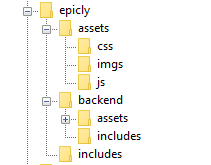
Our project’s current structure looks like this:


>If you need to backtrack, Part 1 is a great place to start!

In part 1, we created our index.php which displays info from our database.

Let’s take this a step further and create a header and a footer for our index.php

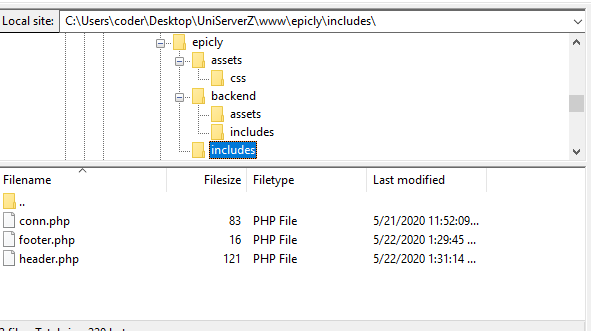
Create a file called header.php and save this to your includes folder.

Next, create a file called footer.php and save this to your includes folder.

Your file structure should now look like this.


A header above all the rest


The header file will be a file we reuse throughout your web application. This file will contain important information that’s vital to the functionality and aesthetic of your website.
The type of info you’ll expect to see in a header.php file:
Script includes
Such as JQuery and important libraries
CSS includes
CSS files loaded from internal or external sources
Meta information
Contains important information that’s readable by search engines.
The basic structure of the beginning of your app, including your menu, and your logo.
For now, how header is going to have a basic layout.

Let’s get our HTML on!

<html>
<head>
<title>My Awesome CMS – Page Title</title>
</head>
<body>


A footer that sets the bar

Create a file called footer.php and save it to your includes folder (yourcms/includes/footer.php).

Add this code to your new file.

</body>
</html>


Next, let’s focus on the gravy… The CSS


CSS, when written beautifully, can truly set you apart.

You can tell your web application to load various styles to specific elements by defining unique identifiers.
Styles that are only used once are denoted with a # (a CSS “ID”) whereas styles that are reused multiple times are denoted with a . (a CSS “class”)

The best way to delve into the realm of CSS is to learn by experience.

Let’s create!


First, we need to create and load our CSS file. Remember our nifty new pal header.php? This created a convenient way to load our CSS file!

Add the following code to your header.php just above the </head> tag.

<link href=”../assets/css/style.css” type=”text/css” rel=”stylesheet”/> 


The ../ in the link to our stylesheet means we have to leave the current directory (the directory that header.php is in) and look for the assets/css/ directories.

Go ahead and create the css folder under your assets folder.

Next we’re going to create some simple CSS to test things out.

It’s time to add some style!


We are going to create two divs.
A div is a divider / section in HTML.
Add this to your index.php (located in your CMS’ root folder) above the <?php tag.

<div id="myfirstid"></div>
<div class="myfirstclass"></div>


Then, create a CSS file

Add this:

#myfirstid{
Background:lightblue;
Font-family:Arial;
Font-size:44px;
Font-weight: Bold;
}
.myfirstclass{
Font-size:15px;
Color: darkblue;
}


Save your newly created CSS to assets/css/ as style.css.

Pulling it all together, let’s see what we can do!


Let’s apply what we just learned to our index.php. But first, we should add our header.php and footer.php files.

Including everyone


Add this to the top of your index.php file:

include(‘includes/header.php’);


Remove the <divs> we used for practice earlier, we have something better in store!

Add this to the bottom of your index.php:

include(‘includes/footer.php’);


Next, let’s modify our code so we can add some style to the data we retrieve from our database.

Modify the following line:
foreach($getmydata as $mydata){ echo "Title: "; echo $mydata['title']; echo "<br/>"; echo "Content: "; echo $mydata['content']; echo "<br/>"; echo "Author: "; echo $mydata['author']; echo "<br/>"; echo "<br/>";


as follows:
?>

<div id=”myfirstid”>
<?php
foreach($getmydata as $mydata){
echo "<div class=”myfirstclass”>Title: ";
echo $mydata['title'];
echo "<br/>";
echo "Content: ";
echo $mydata['content'];
echo "<br/>";
echo "Author: ";
echo $mydata['author'];
echo "</div><br/><br/>";
}?>
</div>
<?php


Your full index.php should now look like this:

<?php
include('includes/header.php');
include('includes/conn.php');

if ($letsconnect -> connect_errno) { echo "Error " . $letsconnect -> connect_error;

}else{

$getmydata=$letsconnect -> query("SELECT * FROM content");

?>
<div id="myfirstid">
<?php
foreach($getmydata as $mydata){
echo "<div class=”myfirstclass”>Title: ";
echo $mydata['title'];
echo "<br/>";
echo "Content: ";
echo $mydata['content'];
echo "<br/>";
echo "Author: ";
echo $mydata['author'];
echo "</div><br/><br/>";
}
?>
</div>
<?php
}

$letsconnect -> close();
include('includes/footer.php');
?>


Go ahead, test it out!

There’s a lot to unpack and I will break things down a little more during our next tutorial!

Challenge


Study the final index.php and try to form a few theories about why closing a php tag is necessary before adding raw html.

Next Up: #CodeWithMe Part 4: Building A Good Base

10082 views · 2 years ago


In today's digital age, where data breaches and cyber attacks are increasingly prevalent, safeguarding sensitive information is paramount. Cryptography, the art of secure communication, plays a crucial role in ensuring data confidentiality, integrity, and authenticity. Implementing cryptography in PHP, one of the most widely used server-side scripting languages, offers a robust means to protect your data. In this guide, we'll explore how to utilize cryptography effectively in PHP to enhance the security of your applications.

Understanding Cryptography Basics


Before diving into PHP implementations, it's essential to grasp the fundamental concepts of cryptography. At its core, cryptography involves techniques for encrypting plaintext data into ciphertext to conceal its meaning from unauthorized parties. Key aspects of cryptography include:
   
. Encryption: The process of converting plaintext data into ciphertext using an algorithm and a secret key. This ciphertext can only be decrypted back to its original form using the appropriate decryption key.
   
. Decryption: The reverse process of encryption, where ciphertext is transformed back into plaintext using the decryption algorithm and the correct key.
   
. Symmetric Encryption: A type of encryption where the same key is used for both encryption and decryption. Examples include AES (Advanced Encryption Standard) and DES (Data Encryption Standard).
   
. Asymmetric Encryption: Also known as public-key cryptography, it involves a pair of keys: a public key for encryption and a private key for decryption. RSA and ECC (Elliptic Curve Cryptography) are common asymmetric encryption algorithms.

Implementing Cryptography in PHP


PHP provides robust cryptographic functions through its OpenSSL and Mcrypt extensions, allowing developers to implement various encryption techniques easily. Here's a step-by-step guide on how to perform common cryptographic operations in PHP:

1. Symmetric Encryption


<?php
$encryptionKey = openssl_random_pseudo_bytes(32);

$plaintext = "Sensitive data to encrypt";
$ciphertext = openssl_encrypt($plaintext, 'aes-256-cbc', $encryptionKey, 0, $iv);

$decryptedText = openssl_decrypt($ciphertext, 'aes-256-cbc', $encryptionKey, 0, $iv);

echo $decryptedText;
?>


2. Asymmetric Encryption


<?php
$config = array(
"digest_alg" => "sha512",
"private_key_bits" => 4096,
"private_key_type" => OPENSSL_KEYTYPE_RSA,
);
$keyPair = openssl_pkey_new($config);

openssl_pkey_export($keyPair, $privateKey);
$publicKey = openssl_pkey_get_details($keyPair)["key"];

$plaintext = "Confidential message";
openssl_public_encrypt($plaintext, $encrypted, $publicKey);

openssl_private_decrypt($encrypted, $decrypted, $privateKey);

echo $decrypted;
?>



Best Practices for Cryptography in PHP


While implementing cryptography in PHP, it's essential to adhere to best practices to ensure maximum security:
   
. Use Strong Algorithms: Always use widely recognized cryptographic algorithms like AES for symmetric encryption and RSA for asymmetric encryption.
   
. Key Management: Safeguard encryption keys carefully. Utilize secure key management practices, such as storing keys in secure vaults and rotating them regularly.
   
. Data Integrity: Implement mechanisms to verify data integrity, such as HMAC (Hash-based Message Authentication Code), to detect tampering attempts.
   
. Secure Communication: When transmitting encrypted data over networks, use secure protocols like HTTPS to prevent eavesdropping and man-in-the-middle attacks.
   
. Stay Updated: Keep PHP and cryptographic libraries up to date to patch any security vulnerabilities and ensure compatibility with the latest cryptographic standards.

By following these guidelines and leveraging the cryptographic capabilities of PHP, developers can strengthen the security posture of their applications and protect sensitive data from unauthorized access. Remember, effective cryptography is not just about encryption but also encompasses key management, integrity verification, and secure communication practices. With diligence and proper implementation, PHP can be a powerful tool for building secure and resilient systems in today's digital landscape.
9400 views · 7 years ago
Midwest PHP and Nomad PHP Join Forces!


Interested in sponsoring? Check out the prospectus


A little history

Several years ago I had the distinct privilege of founding Midwest PHP with Jonathan Sundquist. The goal was simple, to bring an affordable PHP conference to Minnesota and the midwest region.

Midwest PHP was created for one simple reason - there weren't a lot of alternatives, especially affordable ones. At the time, your choices were ZendCon in Silicon Valley, php[tek] in Chicago, or Northeast PHP in Boston. While Northeast PHP formed the blueprint of a community conference - it still required a flight and a costly hotel in Boston. I wanted something where local attendees, college students, and those just beginning in their PHP careers could go to learn, network, and become part of the PHP community.

Shortly after Midwest PHP was formed (originally we were using the name PHPFreeze - until Sundquist told me what a horrible idea it was), Adam Culp launched Sunshine PHP which has become one of the top community focused PHP conferences (but still requires that flight and hotel in Miami). Sundquist and I knew that any reasonable developer would still prefer to attend a conference in a blizzard than enjoy the beautiful Floridian weather (ok, that might not be it, but we still understood the need that existed).

After moving to California for my new job, Jonathan Sundquist continued to run Midwest PHP as more community conferences appeared. With his efforts, and the torch being passed to Mike Willbanks, Midwest PHP celebrated it's seventh consecutive year, becoming the longest continuously running PHP conference (if you go by formed date, if you go by actual conference date Sunshine PHP beats us out by a month).


A renewed focus


Developers at Midwest PHP

Because of the incredible work Jonathan and Mike have done, Midwest PHP has stood the test of time - and the peaks and valleys that come with any conference. With the shifts in the PHP community and the sad loss of several community conferences - we realized the need for Midwest PHP is more now than ever, and to meet that need we needed to reimagine the way the conference operated.

We also realized that the best way to make Midwest PHP accessible was to combine forces, creating a seamless partnership between Nomad PHP and Midwest PHP. Through this partnership we're not only able to stream the event to make it more accessible ($19.95/mo), but also expand the conference.

This year, taking place onApril 2-4, 2020 - Midwest PHP will bring together over 800 developers both in-person and virtually! Making this year truly unique, however, and staying with our purpose of helping new developers be part of the PHP community is abrand new, FREE, beginner track. I'm excited to say we will be giving away 200 tickets to those wishing to attend our Beginner or Learn PHP track!!!

We will also work to keep prices as low as possible as we offer our standard PHP tracks (Everyday PHP and PHP Performance & Security) starting at $250/ person, anda brand new enterprise track geared at developers facing challenges at unprecedented scale starting at $450/ person.

Last but not least, it is our goal with the help of our sponsors to include the workshop day as part of your ticket price - allowing you to get one day of in-depth training, and two more full days of sessions. On top of this, we're also excited to make the Nomad PHP and Nomad JS video libraries available for Standard and Enterprise attendees, providing over 220 additional virtual sessions on demand!


For sponsors

Sponsoring a conference is hard. We understand the challenge of gauging ROI, planning travel, and coordinating outreach. With the combined forces of Midwest PHP and Nomad PHP, we're able to offer sponsors unique plans that maximize their investment - while ensuring the funds go back into the event to create an amazing experience for our attendees.

Beyond Midwest PHP's goal to be the largest PHP conference this year - the included Nomad PHP advertising will help you reach a much larger and broader audience, allowing for follow up advertisements and consistent engagement with the PHP community.


Interested in sponsoring? Check out the prospectus


Next steps

For more information, please visit the Midwest PHP website. The venue, call for papers, and additional information will all be posted there soon.
9321 views · 6 years ago
Top 12 PHP Libraries to Leverage Your Web App Development


PHP, by all means, is an immensely powerful language!


We may fall short of words, but there won't come any end to its qualities. The endless functionalities and possibilities of this server-side scripting language have managed to get it a strong and supportive community of PHP programmers on a global level. At present, PHP powers more than half on websites and applications on the internet.


Do you know what makes PHP so praiseworthy?


It is the simplicity, easy programming structure, and developer-friendly web functionalities that are to be credited to turn PHP into one of the top programming languages. You can create highly interactive and dynamic websites and applications with desired results by making use of PHP.


However, coding often could be a tough and tedious task to accomplish. As a solution to this, you get built-in PHP libraries that optimize the process of coding for maximum productivity.


But what are these libraries?


That's exactly what you will find out as you move ahead in this article, a list of top 12 PHP libraries capable of leading the development process in an intended manner.


So, without waiting any further, let's move ahead to learn about PHP libraries in-depth.


PChart


PChart is a PHP library assisting with the generation of text data in the form of something more appealing to the eyes and known as visual charts.


You can use this library to represent data as bar charts, pie charts, and many more different formats. The PHP script here utilizes SQL queries to put data in the impressive charts or graphs form.


Mink


Another well-known in the list of PHP libraries is Mink. It allows you to keep an eye on if a proper interaction is happening between your web apps and the browser. Eliminating the API differences between the two types of browser emulators, Mink offers an authentic testing environment for you. It also supports PHPUnit, Behat, and Symfony2.


Monolog


Monolog is a PHP logging library that helps you with saving logs to the specified locations by sending them to set files, sockets, inboxes, databases, or other web services. The use of the PSR-3 interface permits to type-hint logs in counter to your libraries that maintain optimum interoperability.


Hoa


This modular, extensible, and structured set of PHP libraries we know as Hoa establishes a link between the research and the industry.


It recommends essential paradigms, mechanisms, and algorithms for building the reliability of a site. Many PHP developers in different parts of the world use Hoa for ideal PHP development.


Guzzle


Guzzle is an HTTP client library for PHP that enables you to send HTTP requests to combine with web services.


It offers a simple interface that makes the development of query strings, POST requests, HTTP cookies, and many other attributes possible. You can also use Guzzle to send synchronous and asynchronous requests from the similar interface.


Ratchet


If your need is to develop real-time, two-directional apps between clients and servers over WebSockets, Ratchet is the PHP library you need to do it effectively.


Creating event-driven apps with Ratchet is a rapid, simple, and easy job to do!


Geocoder


Geocoder is a library to create applications that are very well geo-aware.


With Geocoder, there is an abstraction layer that helps with geocoding manipulations.


It is further split into two parts, known as HttpAdapter and Provider.


ImageWorkshop


ImageWorkshop is an open-source PHP library letting you work over the manipulation of images with layers. You can crop, resize, add watermarks, create thumbnails, and so much more. You can also enhance the images on the sites.


PhpThumb


phpThumb is the library specialized at handling the work associated with creating thumbnails with minimal coding. Accepting every image source type and image formats, it makes you do a lot ranging from rotating or cropping to watermarking or defining the image quality.


Parody


This simple library we know as Parody is used to copy classes and objects. It also provides results for method calls, acquiring properties, instantiating objects, and more. Sequential method chaining is used by Parody to produce defining class structures.


Imagine


This object-oriented PHP library is meant for working with images along with manipulating them. The often adopted operations such as resizing, cropping, and applying filters happen instantly and relatively well with Imagine.


With Imagine, you get a color class that forms the RGB values of any given color. Draw shapes like arc, ellipse, line, etc. with the features available.


PhpFastCache


PhpFastCache is an open-source PHP library that makes caching feasible. Coming as a single-file, it can be integrated within a matter of minutes.


Caching methods supported by PhpFastCache involve apc, memcache, memcached, wincache, pdo, and mpdo.


The Bottom Line


It's not about what extra difference these libraries make; it's about what significant individual contributions these libraries make for a final desired PHP app or website.


A PHP programmer, too, agrees with these libraries' benefits.


It's your time now to try and believe!
9141 views · 2 years ago


In today's dynamic and fast-paced world of web development, ensuring the reliability, performance, and scalability of applications is paramount. Monitoring and observability tools play a crucial role in achieving these goals by providing insights into application metrics, performance trends, and system health. Prometheus, a popular open-source monitoring and alerting toolkit, offers robust capabilities for monitoring infrastructure and application metrics. In this article, we'll explore how to leverage Prometheus with PHP to monitor, analyze, and troubleshoot PHP-based applications effectively.

Understanding Prometheus:


Prometheus is an open-source monitoring and alerting system originally developed by SoundCloud. It is designed for reliability, scalability, and extensibility, making it suitable for monitoring complex, distributed systems. Key features of Prometheus include:

Time Series Data: Prometheus collects time-series data, allowing developers to track metrics such as CPU usage, memory consumption, request latency, and HTTP response codes over time.

PromQL: Prometheus Query Language (PromQL) enables users to query and aggregate metrics, create custom dashboards, and set up alerting rules based on specific conditions.

Scalability and Reliability: Prometheus is designed to be highly scalable and reliable, supporting a distributed architecture with multiple replicas and federated setups for global monitoring.

Integrating Prometheus with PHP:


To integrate Prometheus with PHP applications, developers can utilize client libraries and instrumentation libraries that facilitate metric collection and exposition. The following steps outline the process of integrating Prometheus with PHP:

Choose a Prometheus Client Library: Select a Prometheus client library for PHP that suits your needs. Popular options include prometheus/client_php and php-prometheus/client.

Instrument Your PHP Code: Instrument your PHP application code to collect relevant metrics. This involves adding instrumentation code to track metrics such as request duration, memory usage, database queries, and custom business metrics.

Exposing Metrics: Expose the collected metrics in a format compatible with Prometheus. This typically involves exposing an HTTP endpoint (e.g., /metrics) where Prometheus can scrape the metrics using the Prometheus exposition format.

Configure Prometheus Server: Configure the Prometheus server to scrape metrics from the PHP application's endpoint. Update the Prometheus configuration file (prometheus.yml) to include the target endpoint and define any additional scraping parameters.

Example Integration:


Let's illustrate how to integrate Prometheus with a PHP application using the prometheus/client_php library:

require 'vendor/autoload.php';

use Prometheus\CollectorRegistry;
use Prometheus\Storage\APC;
use Prometheus\RenderTextFormat;

$registry = new CollectorRegistry(new APC());

$requestDuration = $registry->registerCounter('php_requests_total', 'Total number of PHP requests');

$requestDuration->inc();

$renderer = new RenderTextFormat();
echo $renderer->render($registry->getMetricFamilySamples());


In this example, we register a custom metric (php_requests_total) to track the total number of PHP requests. We then increment this metric for each request and expose the metrics endpoint using the Prometheus exposition format.

Benefits of Using Prometheus with PHP:


Real-time Monitoring: Prometheus provides real-time monitoring capabilities, allowing developers to monitor application metrics and diagnose issues promptly.

Scalability: Prometheus scales horizontally, making it suitable for monitoring large-scale deployments and distributed systems.

Alerting: Prometheus supports alerting based on predefined rules, enabling proactive monitoring and alerting for potential issues or anomalies.

Integration: Prometheus integrates seamlessly with various programming languages, platforms, and frameworks, including PHP, enabling comprehensive monitoring across the entire technology stack.

Conclusion:


Prometheus offers powerful capabilities for monitoring and observability, making it a valuable tool for developers and DevOps teams tasked with ensuring the reliability and performance of PHP applications. By integrating Prometheus with PHP using client libraries and instrumentation, developers can gain valuable insights into application metrics, troubleshoot issues effectively, and proactively respond to performance anomalies. Embracing Prometheus as part of your monitoring strategy empowers organizations to build resilient, scalable, and high-performing PHP applications in today's dynamic digital landscape.

SPONSORS

The Ultimate Managed Hosting Platform