PHP & Web Development Blogs

Search Results For: their
Showing 11 to 15 of 30 blog articles.
15872 views · 7 years ago
Working With Thin Controller And Fat Model Concept In Laravel

Models and controllers are one of the most essential programming handlers in the Laravel MVC framework, and both are used vastly for different functional operations. Models in Laravel are created inside the app folder and are mostly used to interact with the database using Eloquent ORM, while the controllers are located inside the directory App/Http/Controllers.

As a programmer, you should have the knowledge how to keep the balance in between the programming usage of Models and controllers. As which one should be more utilized for allowing functional tasks in applications deployed on any PHP MySQL hosting.


What is the Concept of Thin Controller and FAT Models


The concept of the thin controller and fat model is that we do less work in our controllers and more work in our models. Like we use our controllers to validate our data and then pass it to the models. While in models, we define our actual functional logic and main coding operations of the desired application. This code structuring process is also a very basic concept of MVC and also the differentiating factor from the conventional complex programming which we mistakenly ignore sometimes.


Why FAT Controllers Are Bad For Handling Code


Controllers are always meant to be defined short and concise, and it should only be used for receiving requests and return responses to it. Anything else further should be programmed in Models, which is actually made for main functional operations.

Placing functional logic in controllers can be bad for many reasons for your applications deployed on anyhosting for PHP. As it not only makes code structure long but also makes it complex sometimes. Further placing code in Controllers is also not recommended because if same functionality is needed somewhere else in route, then pulling out the whole code from their becomes difficult and so its reusability in the application.

Though Laravel is an MVC framework while developing on laravel, we sometimes ignore this and write mostly all our code including the extending of App\Model and all our functional logic in controller route methods. What we can do here is we can create a sub model of our parent model. For example, our parent model is User then we can create another sub model of username in CustomerModel if you are using the same User model for all types of users. In this model, we will write all the logic related to user type Customer.

So now let's take an example of my existing blog creating comment system with laravel and vuejs. In that article, you can see I have made so much mess in my controller methods. Mostly, I have written all my comments logic in my methods, so to shorten that let's clean them in this article. Inside app folder, I will create a new file with name CommentModel.php. Inside this file, I will write my whole logic for comment functions. This is my basic file:


<?php
namespace App;

use App\Comment;
use App\CommentVote;
use App\CommentSpam;
use App\User;
use Auth;

class CommentModel
{


}

?>


Right now it contains no function but has the reference of all my models which I required for this model. Let's first add a function namedgetallcomments passing$pageId as a parameter inside it. The function will get all the comments for the given page:


public function getAllComments($pageId)
{
$comments = Comment::where('page_id',$pageId)->get();

$commentsData = [];


foreach ($comments as $key) {
$user = User::find($key->users_id);
$name = $user->name;
$replies = $this->replies($key->id);
$photo = $user->first()->photo_url;
$reply = 0;
$vote = 0;
$voteStatus = 0;
$spam = 0;
if(Auth::user()){
$voteByUser = CommentVote::where('comment_id',$key->id)->where('user_id',Auth::user()->id)->first();
$spamComment = CommentSpam::where('comment_id',$key->id)->where('user_id',Auth::user()->id)->first();


if($voteByUser){
$vote = 1;
$voteStatus = $voteByUser->vote;
}

if($spamComment){
$spam = 1;
}
}


if(sizeof($replies) > 0){
$reply = 1;
}

if(!$spam){
array_push($commentsData,[
"name" => $name,
"photo_url" => (string)$photo,
"commentid" => $key->id,
"comment" => $key->comment,
"votes" => $key->votes,
"reply" => $reply,
"votedByUser" =>$vote,
"vote" =>$voteStatus,
"spam" => $spam,
"replies" => $replies,
"date" => $key->created_at->toDateTimeString()
]);
}


}
$collection = collect($commentsData);
return $collection->sortBy('votes');
}


Now I will create another function namedreplies which takes$commentId as a parameter. The function is more or less programmed in the same manner as the upper function get all comments.


protected function replies($commentId)
{
$comments = Comment::where('reply_id',$commentId)->get();
$replies = [];


foreach ($comments as $key) {
$user = User::find($key->users_id);
$name = $user->name;
$photo = $user->first()->photo_url;

$vote = 0;
$voteStatus = 0;
$spam = 0;


if(Auth::user()){
$voteByUser = CommentVote::where('comment_id',$key->id)->where('user_id',Auth::user()->id)->first();
$spamComment = CommentSpam::where('comment_id',$key->id)->where('user_id',Auth::user()->id)->first();

if($voteByUser){
$vote = 1;
$voteStatus = $voteByUser->vote;
}

if($spamComment){
$spam = 1;
}
}
if(!$spam){


array_push($replies,[
"name" => $name,
"photo_url" => $photo,
"commentid" => $key->id,
"comment" => $key->comment,
"votes" => $key->votes,
"votedByUser" => $vote,
"vote" => $voteStatus,
"spam" => $spam,
"date" => $key->created_at->toDateTimeString()
]);
}


}


$collection = collect($replies);
return $collection->sortBy('votes');
}


Now lets create a functioncreate comment which passes$array as a parameter in it:


public function createComment($arary)
{
$comment = Comment::create($array);


if($comment)
return [ "status" => "true","commentId" => $comment->id ];
else
return [ "status" => "false" ];
}


Similarly, Now I will create all the function for comment in myCommentModel, so that all the functions gets accumulated in one model.


<?php
namespace App;

use App\Comment;
use App\CommentSpam;
use App\CommentVote;
use App\User;
use Auth;

class CommentModel
{
public function getAllComments($pageId)
{
$comments = Comment::where('page_id', $pageId)->get();

$commentsData = [];

foreach ($comments as $key) {
$user = User::find($key->users_id);
$name = $user->name;
$replies = $this->replies($key->id);
$photo = $user->first()->photo_url;
$reply = 0;
$vote = 0;
$voteStatus = 0;
$spam = 0;
if (Auth::user()) {
$voteByUser = CommentVote::where('comment_id', $key->id)->where('user_id', Auth::user()->id)->first();
$spamComment = CommentSpam::where('comment_id', $key->id)->where('user_id', Auth::user()->id)->first();

if ($voteByUser) {
$vote = 1;
$voteStatus = $voteByUser->vote;
}

if ($spamComment) {
$spam = 1;
}
}

if (sizeof($replies) > 0) {
$reply = 1;
}

if (!$spam) {
array_push($commentsData, [
"name" => $name,
"photo_url" => (string) $photo,
"commentid" => $key->id,
"comment" => $key->comment,
"votes" => $key->votes,
"reply" => $reply,
"votedByUser" => $vote,
"vote" => $voteStatus,
"spam" => $spam,
"replies" => $replies,
"date" => $key->created_at->toDateTimeString(),
]);
}

}
$collection = collect($commentsData);
return $collection->sortBy('votes');
}

protected function replies($commentId)
{
$comments = Comment::where('reply_id', $commentId)->get();
$replies = [];

foreach ($comments as $key) {
$user = User::find($key->users_id);
$name = $user->name;
$photo = $user->first()->photo_url;

$vote = 0;
$voteStatus = 0;
$spam = 0;

if (Auth::user()) {
$voteByUser = CommentVote::where('comment_id', $key->id)->where('user_id', Auth::user()->id)->first();
$spamComment = CommentSpam::where('comment_id', $key->id)->where('user_id', Auth::user()->id)->first();

if ($voteByUser) {
$vote = 1;
$voteStatus = $voteByUser->vote;
}

if ($spamComment) {
$spam = 1;
}
}
if (!$spam) {

array_push($replies, [
"name" => $name,
"photo_url" => $photo,
"commentid" => $key->id,
"comment" => $key->comment,
"votes" => $key->votes,
"votedByUser" => $vote,
"vote" => $voteStatus,
"spam" => $spam,
"date" => $key->created_at->toDateTimeString(),
]);
}

}

$collection = collect($replies);
return $collection->sortBy('votes');
}

public function createComment($arary)
{
$comment = Comment::create($array);

if ($comment) {
return ["status" => "true", "commentId" => $comment->id];
} else {
return ["status" => "false"];
}

}

public function voteComment($commentId, $array)
{
$comments = Comment::find($commentId);
$data = [
"comment_id" => $commentId,
'vote' => $array->vote,
'user_id' => $array->users_id,
];

if ($array->vote == "up") {
$comment = $comments->first();
$vote = $comment->votes;
$vote++;
$comments->votes = $vote;
$comments->save();
}

if ($array->vote == "down") {
$comment = $comments->first();
$vote = $comment->votes;
$vote--;
$comments->votes = $vote;
$comments->save();
}

if (CommentVote::create($data)) {
return true;
}

}

public function spamComment($commentId, $array)
{
$comments = Comment::find($commentId);

$comment = $comments->first();
$spam = $comment->spam;
$spam++;
$comments->spam = $spam;
$comments->save();

$data = [
"comment_id" => $commentId,
'user_id' => $array->users_id,
];

if (CommentSpam::create($data)) {
return true;
}

}
}
?>


Now we have all our required methods inCommentModel. So now let's clean upCommentController which is currently bit complex and lengthy in code structure. As right nowCommentController look like this:


<?php

namespace App\Http\Controllers;

use Illuminate\Http\Request;
use App\Http\Requests;
use App\Comment;
use App\CommentVote;
use App\CommentSpam;
use App\User;
use Auth;

class CommentController extends Controller
{


public function index($pageId)
{
$comments = Comment::where('page_id',$pageId)->get();

$commentsData = [];


foreach ($comments as $key) {
$user = User::find($key->users_id);
$name = $user->name;
$replies = $this->replies($key->id);
$photo = $user->first()->photo_url;
$reply = 0;
$vote = 0;
$voteStatus = 0;
$spam = 0;
if(Auth::user()){
$voteByUser = CommentVote::where('comment_id',$key->id)->where('user_id',Auth::user()->id)->first();
$spamComment = CommentSpam::where('comment_id',$key->id)->where('user_id',Auth::user()->id)->first();


if($voteByUser){
$vote = 1;
$voteStatus = $voteByUser->vote;
}

if($spamComment){
$spam = 1;
}
}


if(sizeof($replies) > 0){
$reply = 1;
}

if(!$spam){
array_push($commentsData,[
"name" => $name,
"photo_url" => (string)$photo,
"commentid" => $key->id,
"comment" => $key->comment,
"votes" => $key->votes,
"reply" => $reply,
"votedByUser" =>$vote,
"vote" =>$voteStatus,
"spam" => $spam,
"replies" => $replies,
"date" => $key->created_at->toDateTimeString()
]);
}


}
$collection = collect($commentsData);
return $collection->sortBy('votes');
}

protected function replies($commentId)
{
$comments = Comment::where('reply_id',$commentId)->get();
$replies = [];


foreach ($comments as $key) {
$user = User::find($key->users_id);
$name = $user->name;
$photo = $user->first()->photo_url;

$vote = 0;
$voteStatus = 0;
$spam = 0;


if(Auth::user()){
$voteByUser = CommentVote::where('comment_id',$key->id)->where('user_id',Auth::user()->id)->first();
$spamComment = CommentSpam::where('comment_id',$key->id)->where('user_id',Auth::user()->id)->first();

if($voteByUser){
$vote = 1;
$voteStatus = $voteByUser->vote;
}

if($spamComment){
$spam = 1;
}
}
if(!$spam){


array_push($replies,[
"name" => $name,
"photo_url" => $photo,
"commentid" => $key->id,
"comment" => $key->comment,
"votes" => $key->votes,
"votedByUser" => $vote,
"vote" => $voteStatus,
"spam" => $spam,
"date" => $key->created_at->toDateTimeString()
]);
}


}


$collection = collect($replies);
return $collection->sortBy('votes');
}


public function store(Request $request)
{
$this->validate($request, [
'comment' => 'required',
'reply_id' => 'filled',
'page_id' => 'filled',
'users_id' => 'required',
]);
$comment = Comment::create($request->all());
if($comment)
return [ "status" => "true","commentId" => $comment->id ];
}


public function update(Request $request, $commentId,$type)
{
if($type == "vote"){


$this->validate($request, [
'vote' => 'required',
'users_id' => 'required',
]);

$comments = Comment::find($commentId);
$data = [
"comment_id" => $commentId,
'vote' => $request->vote,
'user_id' => $request->users_id,
];

if($request->vote == "up"){
$comment = $comments->first();
$vote = $comment->votes;
$vote++;
$comments->votes = $vote;
$comments->save();
}

if($request->vote == "down"){
$comment = $comments->first();
$vote = $comment->votes;
$vote--;
$comments->votes = $vote;
$comments->save();
}

if(CommentVote::create($data))
return "true";
}

if($type == "spam"){


$this->validate($request, [
'users_id' => 'required',
]);

$comments = Comment::find($commentId);


$comment = $comments->first();
$spam = $comment->spam;
$spam++;
$comments->spam = $spam;
$comments->save();

$data = [
"comment_id" => $commentId,
'user_id' => $request->users_id,
];

if(CommentSpam::create($data))
return "true";
}
}


public function destroy($id)
{
}
}?>


After cleaning up the controller it will look much simpler and easy to understand like this:


<?php

namespace App\Http\Controllers;

use App\CommentModel;
use Illuminate\Http\Request;

class CommentController extends Controller
{

private $commentModel = null;
private function __construct()
{
$this->commentModel = new CommentModel();
}


public function index($pageId)
{
return $this->commentModel->getAllComments($pageId);
}


public function store(Request $request)
{
$this->validate($request, [
'comment' => 'required',
'reply_id' => 'filled',
'page_id' => 'filled',
'users_id' => 'required',
]);
return $this->commentModel->createComment($request->all());
}


public function update(Request $request, $commentId, $type)
{
if ($type == "vote") {

$this->validate($request, [
'vote' => 'required',
'users_id' => 'required',
]);

return $this->commentModel->voteComment($commentId, $request->all());
}

if ($type == "spam") {

$this->validate($request, [
'users_id' => 'required',
]);

return $this->commentModel->spamComment($commentId, $request->all());
}
}

}
?>



Wrap Up!


So Isn't it looking much cleaner and simpler to understand now? This is what actually a thin controller and fat model looks like. We have all our logic related to Comment system programmed in ourCommentModel and our controller is now just used to transfer data from the user to our model and returning the response which is coming from our model.

So this is how the structuring of the thin controller and fat model is made. Give your thoughts in the comments below.
15663 views · 7 years ago
Welcome to PHP 7.1

In case you are living under a rock, the latest version of PHP released last week. PHP developers around the world began rebuilding their development containers with it so they can run their tests. Now it’s your turn. If you haven’t already installed it, you can download it here http://php.net/downloads.php Grab it, get it running in your development environment, and run those unit tests. If all goes well, you can begin planning your staged deployment to production.

If you need a quick start guide to get you going, our good friend Mr Colin O’Dell has just the thing for you “Installing PHP 7.1”. It’ll get you up and going quickly on PHP 7.1.

What’s the big deal about PHP 7.1? I am so glad you asked. Here are the major new features released in PHP 7.1.

* Nullable types
* Void return type
* Iterable pseudo-type
* Class constant visiblity modifiers
* Square bracket syntax for list() and the ability to specify keys in list()
* Catching multiple exceptions types

Now if you want a quick intro to several of these new features, check out our “RFCs of the Future” playlist on YouTube. In it, I talk about 4 of the new features.

Oh and while you are watching things download & compile, why not take the time to give a shoutout to all the core contributors, and a special thank you to Davey Shafik and Joe Watkins, the PHP 7.1 release managers.

Cheers!
=C=
12751 views · 2 years ago


In modern software architecture, developers are constantly exploring new paradigms to enhance the performance, scalability, and maintainability of their applications. One such architectural pattern gaining popularity is Command Query Responsibility Segregation (CQRS). CQRS separates the responsibility of handling read and write operations, offering numerous benefits in complex systems. In this article, we'll delve into CQRS and explore its implementation in PHP.

What is CQRS?


CQRS, coined by Greg Young, is an architectural pattern that segregates the responsibility for handling read and write operations in a system. In traditional CRUD-based architectures, the same model is often used for both reading and writing data. However, CQRS advocates for a clear distinction between commands (write operations that modify state) and queries (read operations that retrieve data).

Key Concepts of CQRS:
   

. Command: Commands represent actions that modify the state of the system. They encapsulate the intent to perform an operation, such as creating, updating, or deleting data.
   
. Query: Queries retrieve data from the system without modifying its state. They are read-only operations used to fetch information for presentation or analysis.
   
. Command Handler: Responsible for processing commands by executing the necessary business logic and updating the system's state accordingly.
   
. Query Handler: Handles queries by retrieving data from the appropriate data source and returning the results to the caller.
   
. Separate Models: CQRS often involves maintaining separate models for commands and queries. This allows each model to be optimized for its specific use case, leading to improved performance and scalability.

Implementing CQRS in PHP:


Implementing CQRS in PHP involves structuring your application to separate command and query responsibilities effectively. Here's a high-level overview of how to implement CQRS in PHP:

1. Define Commands and Queries:


Start by defining the commands and queries your application will support. Commands should encapsulate actions that modify state, while queries should retrieve data.

class CreateProductCommand {
public $name;
public $price;
}

class GetProductQuery {
public $productId;
}


2. Create Command and Query Handlers:


Next, implement handlers for processing commands and queries. Command handlers execute the necessary business logic to fulfill the command, while query handlers retrieve data based on the query criteria.

class CreateProductCommandHandler {
public function handle(CreateProductCommand $command) {
}
}

class GetProductQueryHandler {
public function handle(GetProductQuery $query) {
}
}


3. Use Separate Models:


Maintain separate models for commands and queries to optimize each for its specific purpose. This separation allows you to design models tailored to the needs of write and read operations.

class Product {
public $name;
public $price;
}

class ProductView {
public $name;
public $price;
}


4. Wiring Everything Together:


Finally, wire up your command and query handlers to the appropriate endpoints or controllers in your application. Dispatch commands to their respective handlers and invoke query handlers to retrieve data.

$command = new CreateProductCommand();
$command->name = "Example Product";
$command->price = 99.99;

$handler = new CreateProductCommandHandler();
$handler->handle($command);

$query = new GetProductQuery();
$query->productId = 123;

$handler = new GetProductQueryHandler();
$product = $handler->handle($query);

Benefits of CQRS in PHP:


-Improved Scalability: Separating read and write operations allows you to scale each independently based on demand.

-Enhanced Performance: Optimizing models and handlers for specific tasks can lead to improved performance and responsiveness.

-Simplified Maintenance: Clear separation of concerns makes the codebase easier to understand, maintain, and extend over time.

-Flexibility: CQRS enables flexibility in choosing the most suitable data storage and retrieval mechanisms for different use cases.

Conclusion:


CQRS is a powerful architectural pattern that offers numerous advantages for building complex and scalable PHP applications. By segregating command and query responsibilities, developers can achieve better performance, scalability, and maintainability in their systems. While implementing CQRS in PHP requires careful planning and design, the benefits it provides make it a compelling choice for projects requiring high performance and flexibility.
12521 views · 5 years ago


Welcome back! If you’re new to this series have a look at Part 1 here


Today’s focus is on templating, the aesthetic that will make or break your web application.

Having a clean design with well defined CSS that’s responsive and user friendly goes a long way.

Developers often stick to their lane but delving into templating will bode in your favor, you can indeed
create a functional and launch-worthy application all on your own!

Let’s jump into it!

Structured structure


Everything you tackle should be found with ease down the line. Therefore careful planning is fundamental to the success and sustainability of your project. You’ll also find that clearly defining your work lends itself to more productivity overall as you spend less that explaining your work during a handover / looking for a specific piece of code or resource. You’ll probably end up spending more time on actual work.
Finding your own unique pattern with file structure and CSS identifiers will also work in your favor as something unique to your process will most likely be easier to remember and form a tactile relationship with.

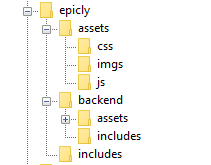
Our project’s current structure looks like this:


>If you need to backtrack, Part 1 is a great place to start!

In part 1, we created our index.php which displays info from our database.

Let’s take this a step further and create a header and a footer for our index.php

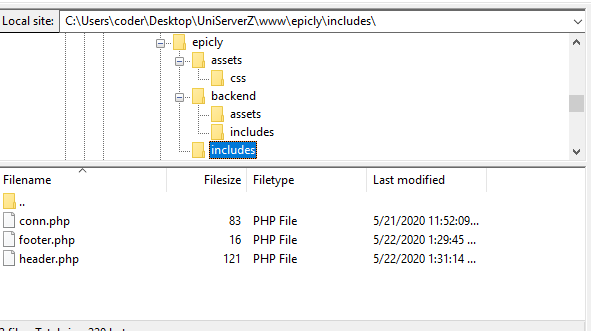
Create a file called header.php and save this to your includes folder.

Next, create a file called footer.php and save this to your includes folder.

Your file structure should now look like this.


A header above all the rest


The header file will be a file we reuse throughout your web application. This file will contain important information that’s vital to the functionality and aesthetic of your website.
The type of info you’ll expect to see in a header.php file:
Script includes
Such as JQuery and important libraries
CSS includes
CSS files loaded from internal or external sources
Meta information
Contains important information that’s readable by search engines.
The basic structure of the beginning of your app, including your menu, and your logo.
For now, how header is going to have a basic layout.

Let’s get our HTML on!

<html>
<head>
<title>My Awesome CMS – Page Title</title>
</head>
<body>


A footer that sets the bar

Create a file called footer.php and save it to your includes folder (yourcms/includes/footer.php).

Add this code to your new file.

</body>
</html>


Next, let’s focus on the gravy… The CSS


CSS, when written beautifully, can truly set you apart.

You can tell your web application to load various styles to specific elements by defining unique identifiers.
Styles that are only used once are denoted with a # (a CSS “ID”) whereas styles that are reused multiple times are denoted with a . (a CSS “class”)

The best way to delve into the realm of CSS is to learn by experience.

Let’s create!


First, we need to create and load our CSS file. Remember our nifty new pal header.php? This created a convenient way to load our CSS file!

Add the following code to your header.php just above the </head> tag.

<link href=”../assets/css/style.css” type=”text/css” rel=”stylesheet”/> 


The ../ in the link to our stylesheet means we have to leave the current directory (the directory that header.php is in) and look for the assets/css/ directories.

Go ahead and create the css folder under your assets folder.

Next we’re going to create some simple CSS to test things out.

It’s time to add some style!


We are going to create two divs.
A div is a divider / section in HTML.
Add this to your index.php (located in your CMS’ root folder) above the <?php tag.

<div id="myfirstid"></div>
<div class="myfirstclass"></div>


Then, create a CSS file

Add this:

#myfirstid{
Background:lightblue;
Font-family:Arial;
Font-size:44px;
Font-weight: Bold;
}
.myfirstclass{
Font-size:15px;
Color: darkblue;
}


Save your newly created CSS to assets/css/ as style.css.

Pulling it all together, let’s see what we can do!


Let’s apply what we just learned to our index.php. But first, we should add our header.php and footer.php files.

Including everyone


Add this to the top of your index.php file:

include(‘includes/header.php’);


Remove the <divs> we used for practice earlier, we have something better in store!

Add this to the bottom of your index.php:

include(‘includes/footer.php’);


Next, let’s modify our code so we can add some style to the data we retrieve from our database.

Modify the following line:
foreach($getmydata as $mydata){ echo "Title: "; echo $mydata['title']; echo "<br/>"; echo "Content: "; echo $mydata['content']; echo "<br/>"; echo "Author: "; echo $mydata['author']; echo "<br/>"; echo "<br/>";


as follows:
?>

<div id=”myfirstid”>
<?php
foreach($getmydata as $mydata){
echo "<div class=”myfirstclass”>Title: ";
echo $mydata['title'];
echo "<br/>";
echo "Content: ";
echo $mydata['content'];
echo "<br/>";
echo "Author: ";
echo $mydata['author'];
echo "</div><br/><br/>";
}?>
</div>
<?php


Your full index.php should now look like this:

<?php
include('includes/header.php');
include('includes/conn.php');

if ($letsconnect -> connect_errno) { echo "Error " . $letsconnect -> connect_error;

}else{

$getmydata=$letsconnect -> query("SELECT * FROM content");

?>
<div id="myfirstid">
<?php
foreach($getmydata as $mydata){
echo "<div class=”myfirstclass”>Title: ";
echo $mydata['title'];
echo "<br/>";
echo "Content: ";
echo $mydata['content'];
echo "<br/>";
echo "Author: ";
echo $mydata['author'];
echo "</div><br/><br/>";
}
?>
</div>
<?php
}

$letsconnect -> close();
include('includes/footer.php');
?>


Go ahead, test it out!

There’s a lot to unpack and I will break things down a little more during our next tutorial!

Challenge


Study the final index.php and try to form a few theories about why closing a php tag is necessary before adding raw html.

Next Up: #CodeWithMe Part 4: Building A Good Base

12497 views · 7 years ago
Halloween is filled with ghouls, ghosts, zombies and lots of other spookiness, but the scariest thing ever is FOMO. It’s conference season and several have their call for papers out (including us at Nomad PHP :D). This is the perfect time for you to share your knowledge with the community. Whether it’s your first time or 100th time - it can be scary to put yourself out there and do a talk, but worse than that is not taking the chance and submitting your talk and doing the presentation. Plus, many of these events host lightning talks (short 5-15 minute talks) - meaning you can test out your talk risk free ;)

So here is your chance - submit for one or submit for all of them. May the odds be ever in your favor!

Fosdem 2019

First we have Fosdem 2019 which will take place on February 2 & 3 in Brussels,Belgium. Some facts about this call for papers:
*Deadline: November 3, 2018
* Presentations are expected to be 50 minutes long (including audience questions) and should cater to a varied technical audience. For examples check out youtube.
*Submit your proposals via Pentabarf: https://fosdem.org/submit.
* The conference covers reasonable travel expenses agreed upon in advance as well as arranges accommodations

Midwest PHP 2019

Next up we have Midwest PHP which will take place on March 8 & 9 in Bloomington, Minnesota.
*Deadline: November 15, 2018
* There is a speaker package included (conference pass, 2 hotel nights, airfare/travel - $500 max, lunch, etc.)
* Make sure the talk title and abstract define the exact topic and what you hope people will learn from it.
* Recommended to submit more than one talk because it can increase your chances of one of them being picked.
*Submit your talk here: [https://cfp.midwestphp.org/] (https://cfp.midwestphp.org/)

Longhorn PHP

Next we have Longhorn PHP which will take place on May 2 (tutorial day) then MAy 3 &4 (conference) in Austin, Texas.
*Deadline: December 15, 2018
* For all speakers, you'll get a full conference pass (tutorial day and main conference days), including access to lunch, after-parties, and any other activities included in the conference.
* For speakers remote to the Austin area, we'll provide 3 nights at the speaker hotel (4 nights if presenting a talk and a tutorial) near the conference venue.
* For speakers outside Texas, we'll book you an Economy or equivalent round-trip airfare on a flight into Austin we'd be comfortable taking ourselves (we're conference speakers too!). Plus, we'll arrange transportation between the Austin airport and the speaker hotel.
* Three different session lengths: 3 hour tutorials, 60 minute talks, and 30 minute talks.
* It doesn't have to just be a PHP related talk. For more information on talks click here.
*Submit your talk here: https://cfp.longhornphp.com/.

Laravel Live India 2019

Then we have LaravelLive India 2019 in Mumbai, India.
*Deadline: December 31, 2018
* Talk length is 30 minutes - Q&A up to the presenters discretion but would be included in the 30 minute time limit.
* Talks will be recorded and distributed for free as well as the presentation slides.
* Looking for a range of talks from PHP (security, testing and frameworks), web development, HTML5, JavaScript, mobile development, emerging technologies and non-technical proposals that will appeal to developers.
*Talk guidelines: Objective with clear expectation for audience, short and to the point description, mention of employer is only allowed at the beginning of the content and background image/wallpaper shouldn’t include company name/logos.
*Submit your talk here: [https://www.papercall.io/laravellive-india] (https://www.papercall.io/laravellive-india)

Nomad PHP

(you know you want to)

Last but not least - this is an ongoing call for papers. This is perfect if you want to present from the comfort of your office, home or really wherever you are. It’s via RingCentral meetings and will be live and recorded. This is for none other than Nomad PHP.
*Deadline: Anytime :D
* Talk length: 45 - 60 minutes.
* Talks should be unique to Nomad PHP and not available in video format online.
* Talk should not be recorded or made available elsewhere online for at least 3 months following your talk.
* The talk will be featured on our page and promoted via social media.
* Speakers will receive a financial stipend.
* Upon being selected we will reach out with further details.
*Submit here: [https://www.papercall.io/nomadphp] (https://www.papercall.io/nomadphp)
Now that you have some information - it’s the perfect time to take it all in and get started on your talk proposals :)! Looking forward to seeing all the amazing talks that will be coming out!!!

SPONSORS

The Ultimate Managed Hosting Platform